Summarize this with
 ChatGPT
 Claude
 Gemini
 Perplexity
Preview of the DM automation 👇
TL;DR: A coaching DM funnel qualifies leads directly in the Instagram inbox, in a single flow: a fan comments with a keyword, immediately gets a public reply, then a personal DM plus voice memo, picks their pain point via a button, receives a tailored case study along with email capture, books via Calendly, and your sales team gets an email as soon as the link is clicked. In this copy-paste guide we build the complete flow (Comment Trigger → Send comment reply → Send message → Send audio → Ask Question with 4 branches → Collect Email → Send Link → Sales Alert → Follow-up) in about 25 minutes with replient.ai. The flow is Meta-approved, GDPR-compliant and free of any ManyChat compliance risk.
As co-founder of replient.ai, over the past few years I've built hundreds of coach funnels together with my brother Markus, business coaches, fitness trainers, life coaches, money mentors. And no matter how different the niches are, the problem always looks the same at the start: the coach makes a strong reel with a clear call-to-action („Comment COACHING and I'll send you my 3-pain-point analysis“), gets 300 or 600 comments under the post, and then tries to reply manually. Markus once messaged me from the couch: „Thomas, I have 180 DMs open, everyone wants the funnel audit, I'll never get through it.“ Three days later, 90% of the leads were cold. No follow-up, no sales call, no revenue. That exact couch moment is the reason we built the coaching funnel flow that I'll walk you through here step by step.
This is not a theory blog, but a finished template with screenshots from the real replient.ai builder. If you copy and adapt it, you'll have a lead machine running in under 25 minutes that turns every comment into a structured sales conversation, without you typing a single DM manually.
Why classic coaching funnels fail on Instagram
Most coaches build their lead gen exactly the wrong way. I see it in every onboarding call at replient.ai: the coach posts a reel that aims at an intro call, and either links a generic „link in bio“ or posts the Calendly link directly under the comment. Both burn leads.
Three reasons why that doesn't work:
- You don't qualify. Someone who comments under a „How I tripled my client count“ reel isn't automatically ready for a €2,000 coaching program. Maybe the lead is a completely different persona type, too early, wrong niche, or just looking for content inspiration. If you funnel all 300 commenters into the same intro-call slot, you'll be sitting there on Monday with ten 30-minute calls, eight of which will never buy.
- You lose personalization. A generic „Hi, here's my Calendly“ has a miserable conversion rate on Instagram on average. What works: a voice message that names the fan and genuinely sounds personal. The difference between a text DM and a voice memo in open and engagement rates is significant, and it shows up especially clearly with coaching audiences that buy emotionally rather than rationally.
- Your sales team knows nothing about hot leads. When a fan actually clicks your Calendly link, they are ready to buy right now. But no one notifies your sales team (or you), the lead books the next available slot, maybe gets a standard confirmation email, and by the appointment three days later the desire to buy is gone.
A proper coaching DM automation flips all three points: it qualifies through pain point selection, it personalizes via voice memo and first-name variable, and it alerts your sales team at the moment of click confirmation. That's exactly what we build here.
What this DM funnel template delivers in numbers
Three data points that support the business case (not replient's own figures, all from independent third parties):
- Instagram as a B2C coaching channel: According to Backlinko's Instagram statistics, over 2 billion people worldwide actively use Instagram (Backlinko, 2025). For coaches in the DACH region, the platform still ranks in the top 3 acquisition channels alongside LinkedIn and YouTube.
- Speed matters enormously: The classic Lead Response Management Study by InsideSales (via HBR) shows that contacts called within one hour have a many times higher likelihood of qualifying compared to „only the next day“ (HBR/InsideSales, 2011). In the DM world the window is even smaller: a fan who comments on your Instagram right now is cognitively gone within three hours.
- Personalization pays off: According to the Salesforce State of the Connected Customer Report, 73% of customers expect individual personalization, not „Hi [first name]“, but genuinely addressing their context (Salesforce, 2024). That is exactly what a pain-branching flow delivers, playing out a different case study and a different positioning per answer.
The complete coaching DM funnel: what we're building today
We build one flow that matches exactly the template that lives in the replient.ai builder under the name „Coaching Funnel (Pain-Audio-Testimonial-Call)“. The logic: a fan comments the keyword (we use COACHING) under any coach post → publicly they get a friendly reply → within seconds a personal message plus voice memo lands in their DM inbox → a minute later the flow asks about their biggest challenge via a button selection → depending on the answer they get a matching case study, are tagged, enter their email and receive the Calendly link → as soon as they click, an email goes out to your sales team → if they don't click, a gentle reminder follows 20 hours later.
The flow consists of nine components:
- Comment Trigger, comment with keyword
COACHINGon any post (Instagram and Facebook) - Send comment reply, public AI reply under the comment (social proof)
- Send message, personal DM greeting with
{{contact.username}} - Send audio, recorded voice message from the coach (personalized, warm)
- Time Delay, 1 minute, so the voice is heard first
- Ask Question – „What's your biggest challenge?“ with 4 quick-reply buttons
- Branch per Pain Point, per button: Add Tag → Collect Email → Send Link (Calendly)
- Send Email Notification, sales alert to your team as soon as the Calendly link is clicked
- Time Delay + Follow-up, if no click after one day: reminder DM, plus AI auto-reply as a fallback
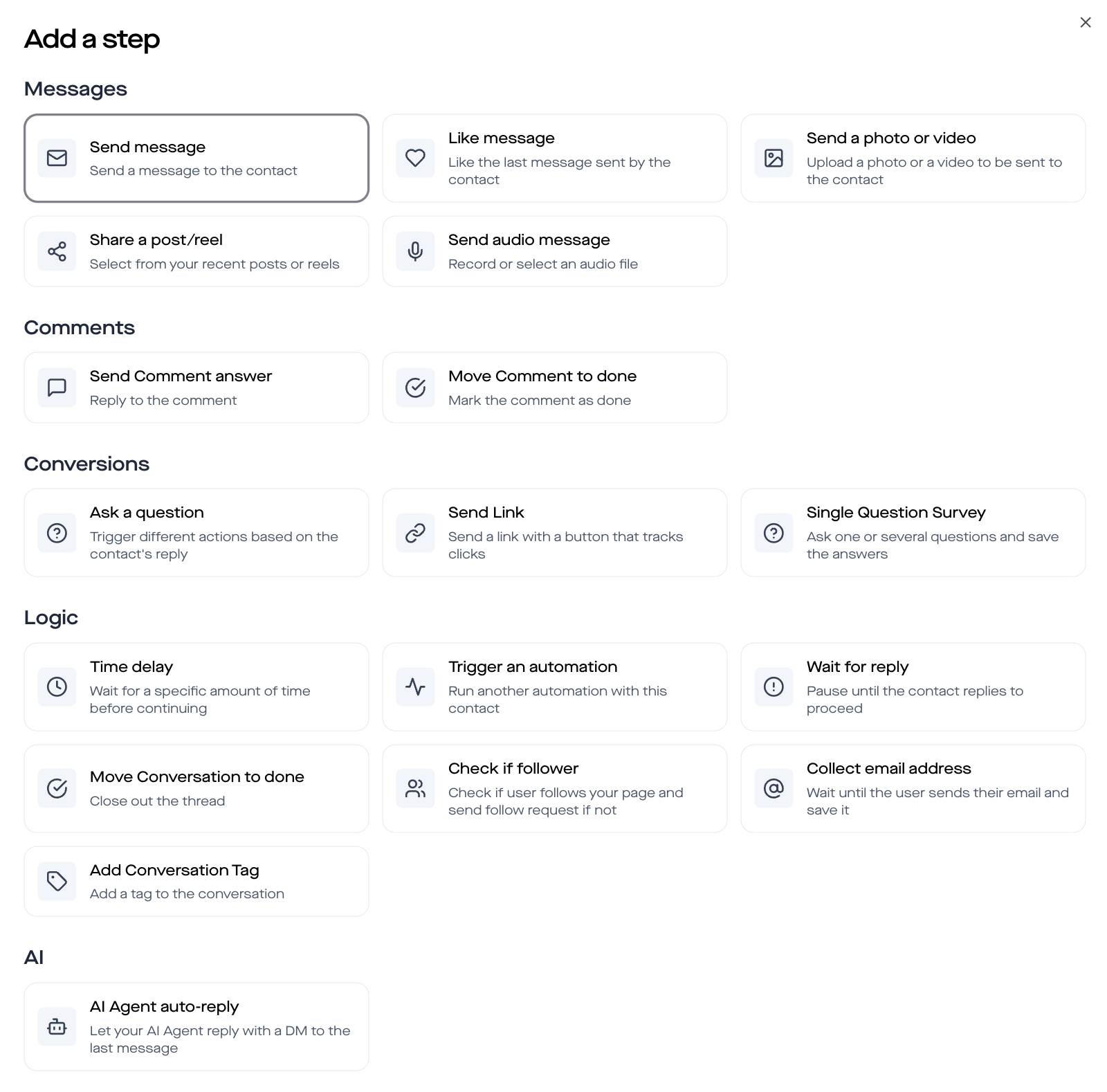
Each building block is a single node in the flow builder that you connect by drag and drop. The first configuration takes about 25 minutes, after that you simply duplicate the template for each new coaching niche.
If you're just getting started with DM automation, first read the DM automation guide for Instagram & Facebook – there we explain the basics (Meta Business Partner, GDPR, 24-hour window) that we assume as context here.
Step 1: Comment trigger with keyword `COACHING`
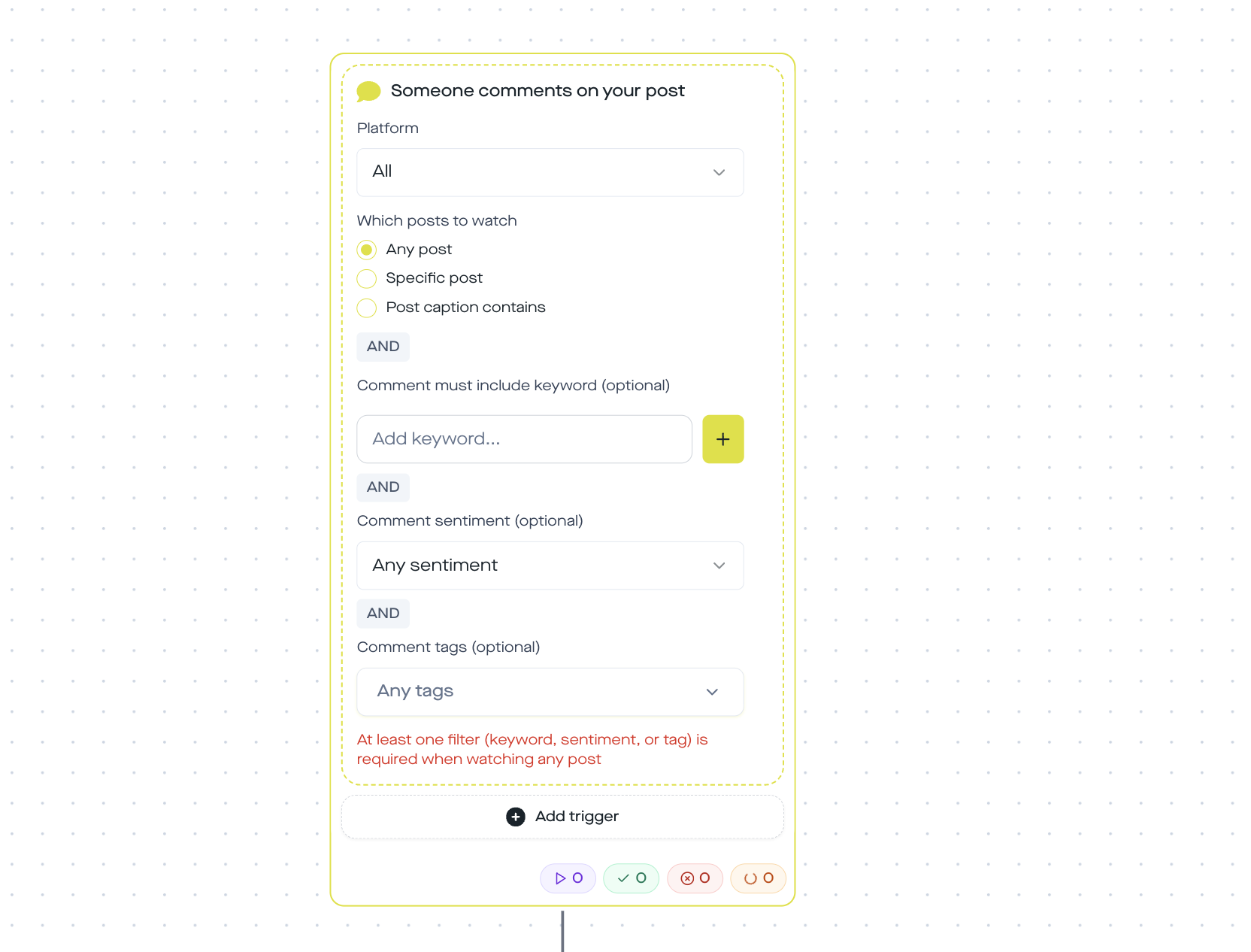
The whole automation starts with a single event: someone comments under one of your posts and the keyword COACHING is included. In the replient.ai builder you open the trigger screen via Automations → New Automation and select „Someone comments on your post“.
Three settings I always recommend during the onboarding call:
- Scope: any post, let the trigger run on all your posts, not just one specific post. Otherwise you will have to reactivate the flow for every new Reel.
- Platform: all, Instagram and Facebook in parallel. Even if 90% of your coaching leads are on Instagram, the 10% on Facebook are free, because the same flow serves both platforms.
- Keyword: COACHING (in caps, but matching is case-insensitive), short enough so it's easy to type under the Reel. Alternatives like
STARTorICHare too unspecific and would also trigger on random comments.
Pro tip from everyday builder use: Always write the call-to-action explicitly under the reel itself („Comment COACHING and I'll send you…“). In my experience, hashtags, emojis or hidden CTAs significantly reduce the trigger rate. Markus tested this with a life-coach client, a clear CTA in the video plus in the caption text tripled the comments compared to just a subtle mention at the end.
Step 2: Public reply under the comment (Send comment reply)
Before the DM even starts, you respond publicly under the comment. Sounds trivial, but it's social proof on steroids: when 300 people under the reel see „the coach replied to every single comment“, it looks active and alive, even though it's fully automated.
In the replient.ai builder this step is called Send comment reply. You have three options:
- First AI suggestion, the replient.ai AI generates an on-the-fly reply based on your brand voice (which it learned from your previous comments and the website)
- Custom variants, you set up 5 to 10 manually written variants (e.g. „Just sent you something 💌“, „Check your DMs 👀“, „It's in your inbox!“), and the flow rotates through them randomly
- {{contact.username}} variable, every reply names the commenter, which greatly increases the perceived personality
In the H8 template we use by default the second AI suggestion, it sticks even more to your brand voice than the first and sounds less generic. If you want full control, switch to Custom Variants.
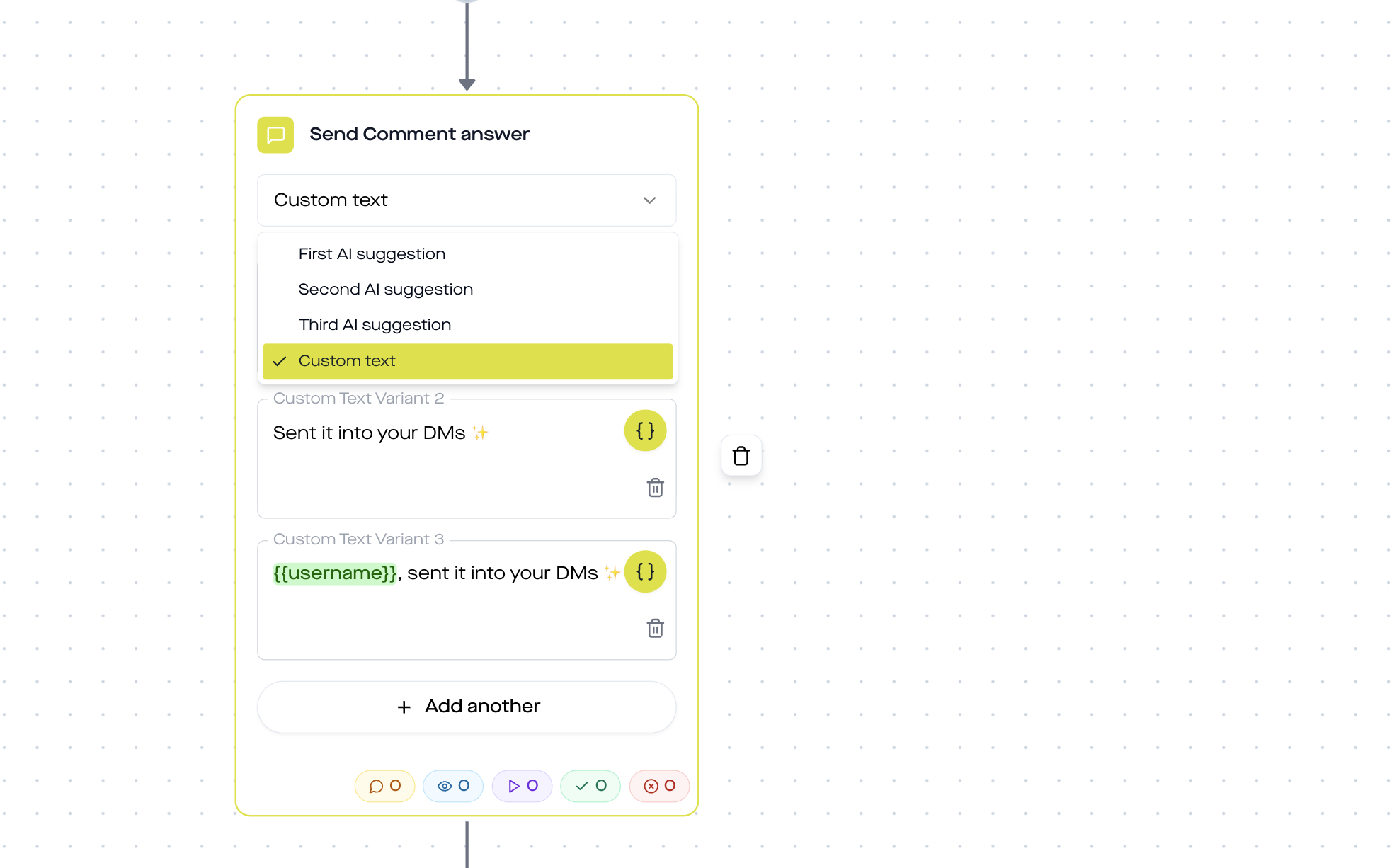
Why two AI suggestions? Because Instagram and Facebook classify posting exactly identical comments in quick succession as spam. By rotating through several variants you protect your account. At the same time, the reply stays coherent with your style, because the AI was trained on your historical data, more on that in the guide AI in community management.
Step 3: Personal DM greeting with name variable
Now comes the first private touchpoint. The Send message step sends a DM to the commenter’s Instagram or Facebook inbox. The template says:
Hey {{contact.username}}, so glad you reached out. I’m sending you a quick voice message 🎙️
You translate that for the DACH market, of course:
Hey {{contact.username}}, great that you reached out. I'll send you a quick voice message in a moment 🎙️
The variable {{contact.username}} automatically pulls the commenter’s Instagram or Facebook handle. In the replient.ai Builder you can see the variable picker on the left, there you can also insert {{contact.name}} (real name, if public), {{contact.followerCount}} or {{contact.profilePictureUrl}}. For coaching funnels I usually use only the username, because real names on Instagram are often not public and then the variable remains empty.
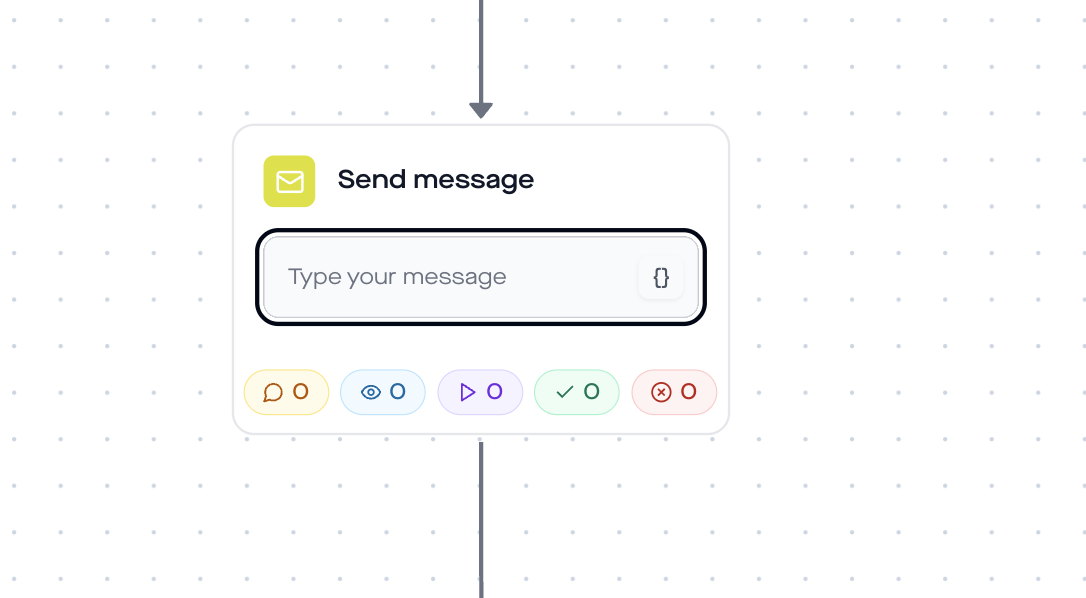
Why the name variable makes the difference: According to Salesforce, 73% of consumers expect personalization. A fan who sees their own handle in the DM is psychologically more activated than with „Hi, thanks for your comment“. It's not rocket science, but 99% of coaches don't do it manually because they lack the time. Automated, it's a copy-paste mini-upgrade that pays off massively at scale.

Step 4: Send voice memo (Send audio), the conversion booster
Now comes the step that clearly sets this flow apart from a classic lead magnet funnel: the Send audio step. Here the coach uploads a pre-recorded voice message that the fan receives directly in their DM inbox, as a real Instagram voice memo with waveform, seconds display and play button.
What I recommend to every coach who sets up this flow:
- 30 to 45 seconds max. The voice is a bridge to qualification, not the pitch. Too long and the fan drops off.
- Casual tone, calm voice, one clear next step. Example script: „Hey, thanks for taking the time. Before I send you anything, I'd like to know where you currently stand. I just sent you three options, can you grab the one that fits? Looking forward to getting to know you.“
- No hard sell. The voice builds rapport, it is not for closing. If you pitch here you burn the flow.
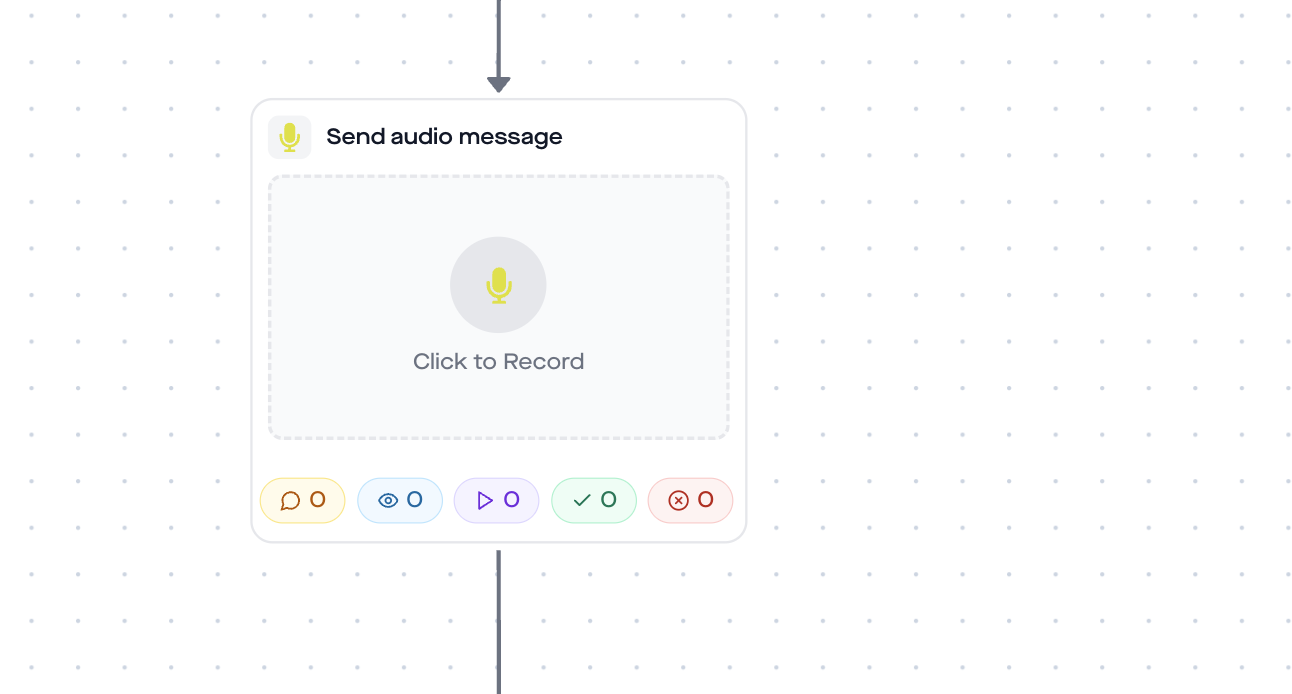
The Send Audio step uses the official Instagram Graph API (Meta Messenger Platform). Prerequisite: you're connected with replient.ai as a Meta Business Partner tool. Facebook pages work identically via the same API. ManyChat can do this too, but offers no GDPR-compliant serverless option in the EU, more on that in the comparison ManyChat alternative.
Observation from real coach funnels: Markus ran the flow for one of our business coach clients once without a voice memo (text DM only) and measured it against the version with voice. The completion rate up to the Calendly click was noticeably higher with a voice memo. The voice makes the flow human, and coaches sell through trust, not features.
Step 5: Time delay (1 minute)
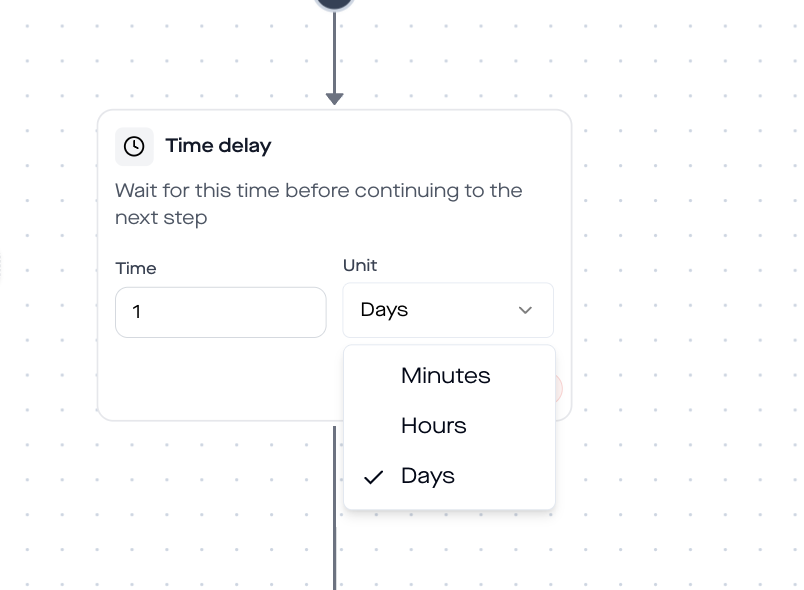
An underrated step: before the flow asks the next question, it waits 60 seconds. Why? Because the fan needs to listen to the voice memo first. If the ask question comes immediately after, the voice goes unheard, and you lose the emotional bridge it builds.
In the builder, the step is called Time Delay. Three fields:
- Duration:
1 - Unit:
minutes(Alternatively: seconds, hours, days)
For coaching funnels I recommend 1 minute. For text-only DMs (without voice) I would go down to 30 seconds. If you're unsure, start with 1 minute and watch in the DM Automation Analytics where most fans drop out.
Step 6: Ask Question, the pain-point branch point
This is the core of the funnel. With the Ask Question step you qualify automatically, without the coach having to type. The flow asks a multiple-choice question, the fan taps an option, and each option opens its own branch in the flow builder.
In the H8 template the question is:
What’s your biggest challenge right now?
With four button options:
- Lack of clarity, clarity pain (common with early-stage coaches, career changers)
- No focus, focus pain (common with multi-passionate creatives, solopreneurs)
- Zero visibility, visibility pain (common with online business coaches)
- Something else, catch-all for people who don't find any of the three fitting
Translated for the DACH market:
- Lack of clarity
- Too many projects at once
- No online visibility
- Something else
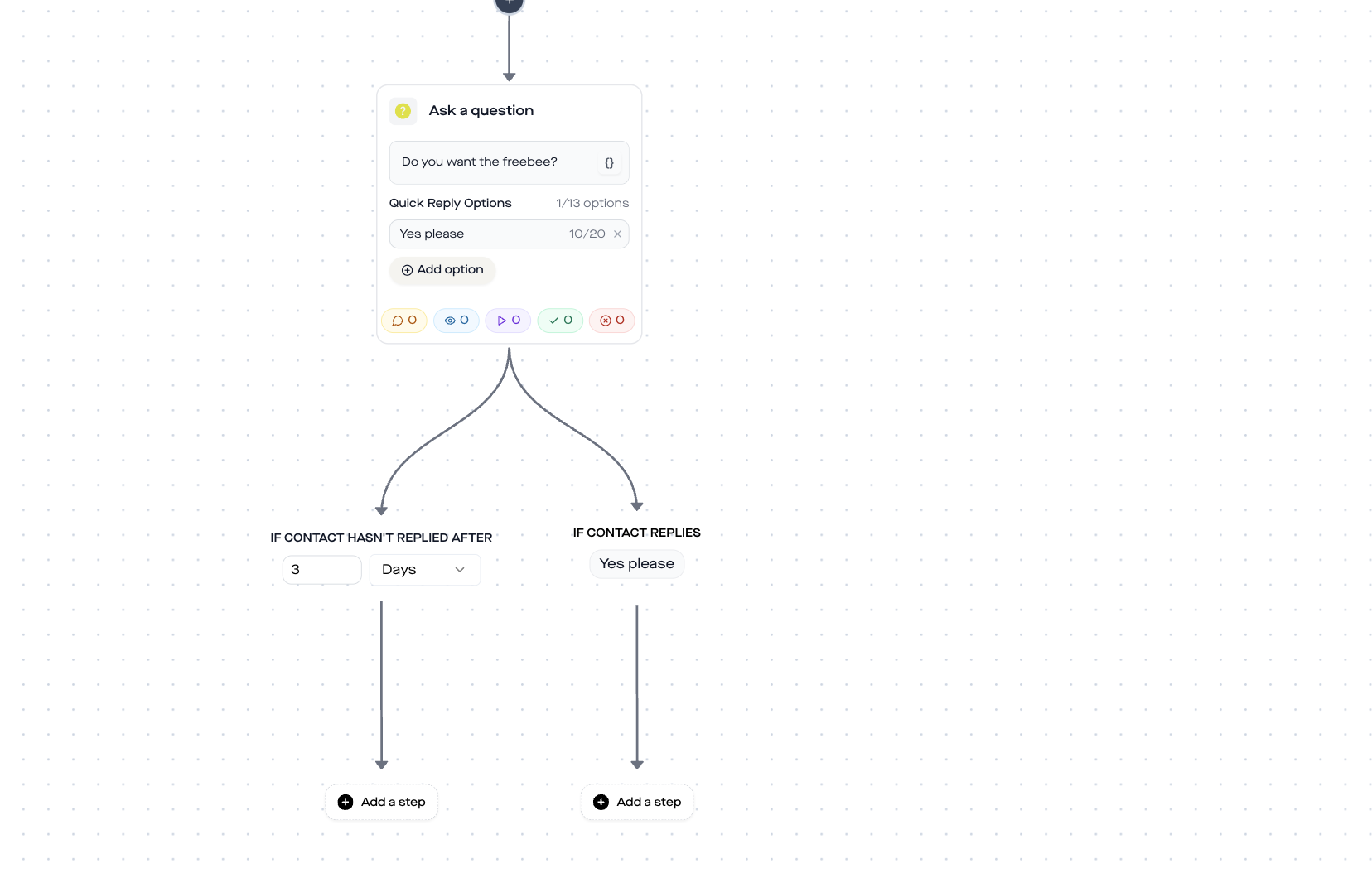
Why exactly 4 options? Three is too few (the fan feels pressured), five is too many (decision fatigue). Four plus „Something else“ is the balance I've seen perform best in coach funnels over the last 18 months. The three main options should be the three most common pains in your niche, the fourth is your safety net.
Each option gets its own column in the flow builder, figuratively speaking: the flow splits into four parallel tracks. The next chapter shows what happens in each track.
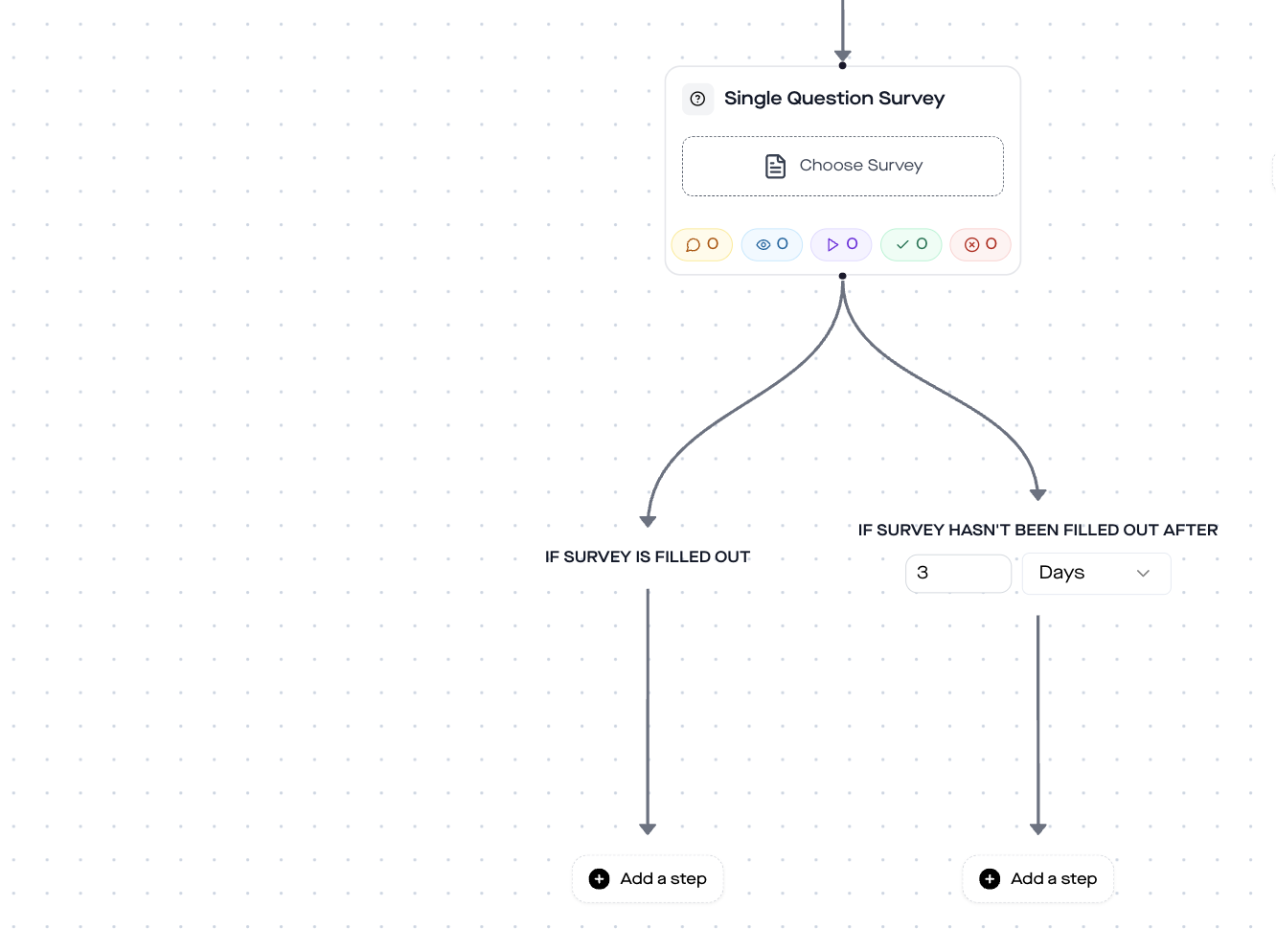
Step 7: Per branch, Add Tag, Collect Email, Send Link
Now comes what turns the DM funnel into a real qualification funnel. For each pain-point branch, three action steps run one after another:
7.1 Add Conversation Tag
The first step in each branch is Add Conversation Tag. The flow tags the contact based on their reply:
- Lack of clarity → Tag
coach-clarity - No focus → Tag
coach-focus - Zero visibility → Tag
coach-visibility - Something else → Tag
coach-custom
These tags land on your contact's conversation object in replient.ai and can later be filtered in the comments/DMs view. If in two weeks you want to run a retargeting campaign „All leads with the coach-visibility tag now get my new visibility webinar“, you'll find the list in three clicks.
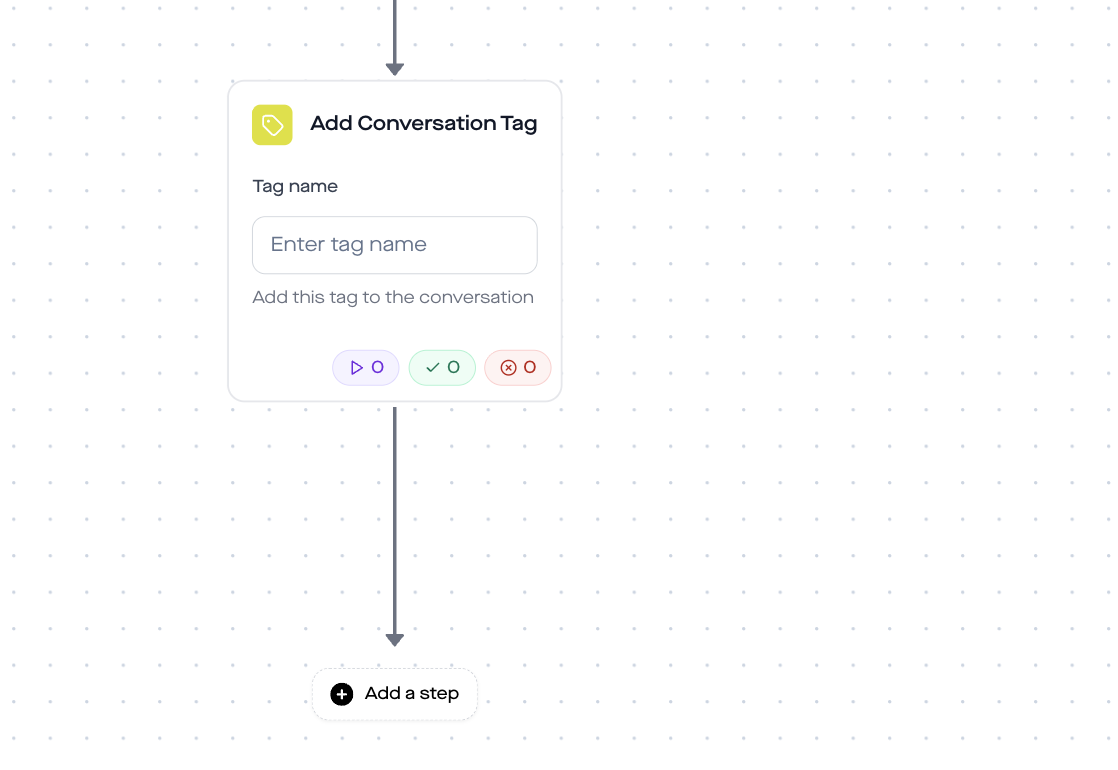
7.2 Collect Email
The second step is the Collect Email node. The flow asks:
I’d love to send you a matching case study - what’s your email?
Again: translate for DACH. I usually use:
Could you send me your email? I'll send you a case study that exactly matches your pain point.
Three things the Collect Email step does automatically:
- Validation: It checks whether the entered message is a valid email address (standard regex). If not, it sends the fallback message „That doesn’t look like a valid email address…“ and tries again, a maximum of 3 attempts (Max Attempts is configurable).
- Webhook forwarding: In the Collect Email settings you enter a webhook URL (e.g. from Zapier, Make.com, or directly your CRM like ActiveCampaign, Mailchimp, or Klaviyo). The collected email is sent automatically.
- Branching: The step has two exits, If email provided and If email isn’t provided (after max attempts). So you can also route fans who don't want to give an email (usually: just the Calendly link without email capture).
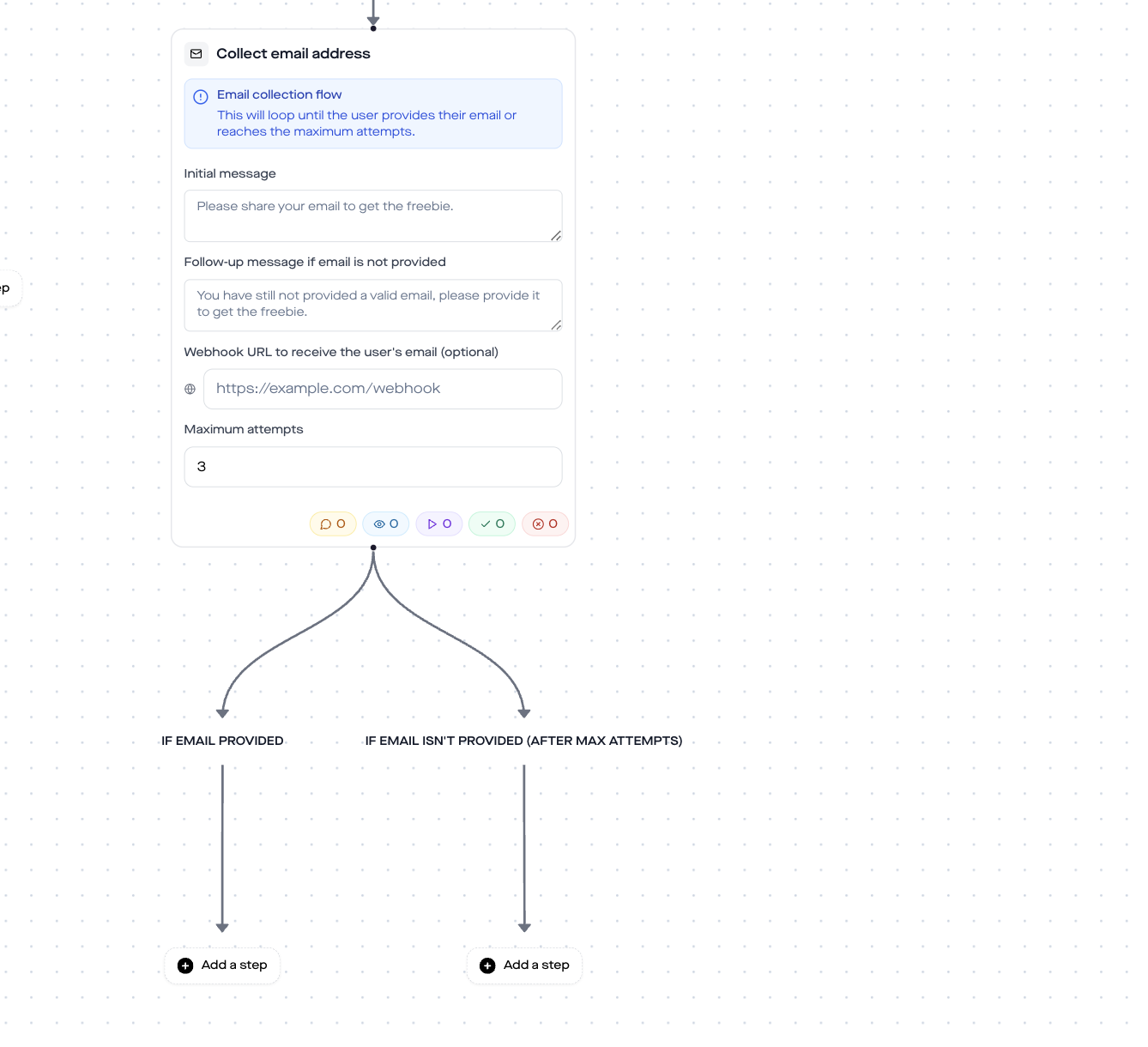
GDPR note: The email request in an automation flow is an opt-in that must be documented under Art. 6(1)(a) GDPR. In practice this means: clearly state in your initial question or in the Send Message step before it what happens with the address („I store it in my email tool, you can unsubscribe at any time“). replient.ai stores the address plus timestamp plus source conversation as proof.
7.3 Send Link: the Calendly call link
The third step is Send Link. The flow sends a trackable button („Book Strategy Call“) with a click counter. In the H8 template the subtitle reads „Calendly“, the name of your booking tool. Alternative tools that work exactly the same:
| Booking tool | Plans from | Supported features |
|---|---|---|
| Calendly | Free | Unlimited events, round-robin, reminders |
| Cal.com | Free | Open source, self-hosting, GDPR-first |
| Acuity | From $16/month | Payments, packages, group calls |
| Google Calendar appointment schedules | Google Workspace | Minimal, but native |
| SimplyBook.me | Free | Standalone booking page |
For coaches, Calendly plus Stripe integration is the gold standard: a 30-minute free slot without payment, and a 60-minute paid slot with direct payment.
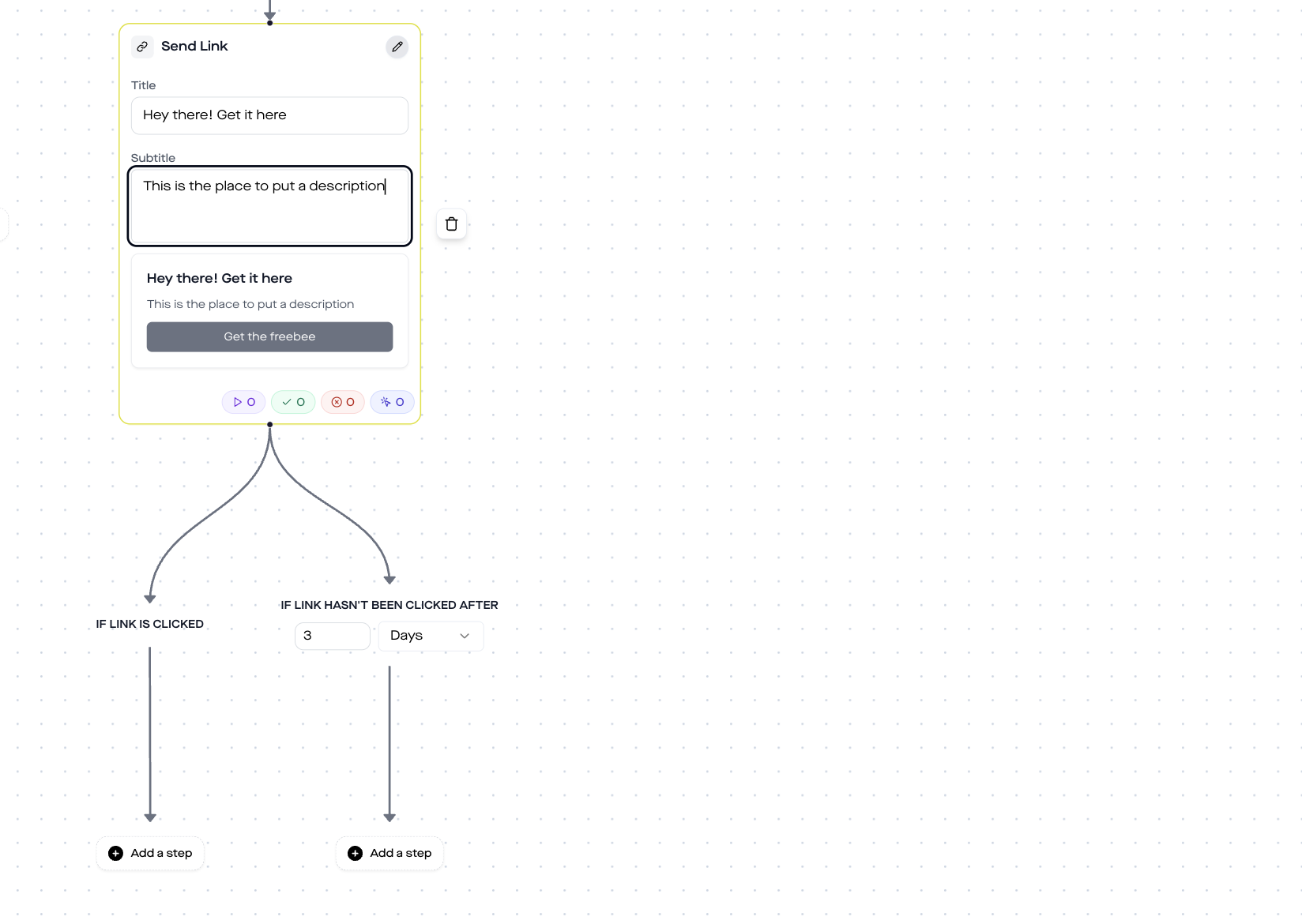
Important: The Send Link step has two exits:
- If link is clicked, the fan has opened the call slot (even if they have not booked yet). This is your hot lead moment.
- If link hasn’t been clicked after 1 day, the flow waits 1 day (configurable) and then reacts.
We'll expand these two branches next.
Step 8: Sales alert on click (Send Email Notification)
As soon as the Calendly link is clicked, the Flow automatically triggers a Send Email Notification step. This is the hidden game-changer of this funnel: your sales team (or you) get an email in the inbox in real time, the second the fan clicks the booking link.
In the template the recipient sales@brand.com is entered, you swap that for your sales team's email address or your own inbox. If multiple people should be alerted, add them as a comma-separated list.
What is automatically included in the alert email:
- The fan's Instagram/Facebook handle (directly linked to the profile page)
- The selected pain point (from the Ask Question step)
- The collected email address (if provided)
- Click timestamp
- Link to the conversation in replient.ai (for the conversation history)
Why this makes a difference: a coach who checks their email inbox in the evening and sees „Hot lead from today's lunchtime reel: visibility pain, email xy@gmail.com, clicked Calendly at 2:37 pm″ can act immediately. They follow up with a personal DM („Saw you're checking out my Calendly, if no slot works for you, I'm happy to set up a personal one“). That's the difference between a lead and revenue.
Step 9: Follow-up if no click
Not every fan clicks right away. Some read the DM only in the evening, some don't have a calendar open on their phone. For this case there's the If link hasn’t been clicked after 1 day branch.
In the template the following happens:
- Time Delay 20 hours, wait 20 hours after the DM (within Meta's 24-hour messaging window)
- Send message, reminder DM: „Was this helpful? If you have any questions, just reply 💬“ (DACH: „War das hilfreich? Bei Fragen einfach antworten 💬“)
- Wait for Reply, the Flow pauses and waits to see if the fan replies
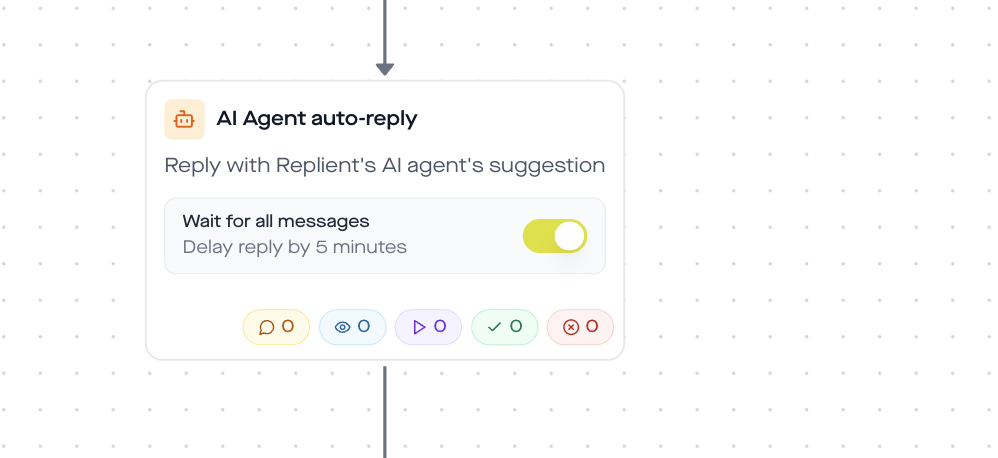
- AI Auto-Reply, if the fan replies, the replient.ai AI agent takes over and continues the conversation, based on your saved brand voice documents
The last building block, AI Auto-Reply with waitForAllMessages: true, is one of the most powerful features in the replient.ai builder. It waits until the fan has sent all messages (in case they send three short DMs in quick succession), summarizes them internally, and replies once, coherently, in your brand voice. More on that in the guide AI in community management.
What the template does not replace (and where you need to be careful)
Three honest boundaries I always bring up in onboarding calls:
- The quality of your reel remains your bottleneck. The best DM funnel in the world won't get leads if the reel has no hook. At replient.ai we've seen coaches activate the flow, but the reel gets 12 comments. 12 leads are still 12, but the funnel only enters its scaling zone at 100+ comments per post.
- Pain-branching is only as good as your case studies. If you have a real case study ready in your CRM for each pain (PDF, video, link), personalization works. If the flow directs all four branches to the same generic landing page, it disappoints the fan. Invest an afternoon, write three short pain-specific case study pages, that's the lever.
- GDPR is your responsibility, not the tool's. replient.ai is a Meta Business Partner and hosts in the EU (more on that in the replient GDPR documentation). But you have to formulate the substantive consent (what you send to whom, and why) yourself. For coaching funnels, an „I'll send you the case study by email, you can unsubscribe at any time“ opt-in note is enough.
Manual vs. automated: What the funnel really saves
An honest calculation I do with every coach during onboarding. Say: 10 posts per month, an average of 120 comments per post with the COACHING keyword. That is 1,200 leads per month flowing into the funnel.
| Step | Manual (Coach or VA) | Automated (replient.ai) |
|---|---|---|
| Public comment reply | 30 sec/comment = 600 min | 0 min |
| Write a personal DM | 60 sec/contact = 1,200 min | 0 min |
| Record & send voice memo | 90 sec/contact = 1,800 min | 0 min (record once) |
| Ask & tag pain point | 60 sec/contact = 1,200 min | 0 min |
| Send case study + Calendly | 45 sec/contact = 900 min | 0 min |
| Sales alert to team | 30 sec/contact = 600 min | 0 min |
| Total / month | ≈ 105 hrs | ≈ 30 min setup + 0 min ongoing |
At an hourly rate of €40/hr (virtual assistant), that's about €4,200/month in costs, for a process that, automated, takes about 30 minutes of one-time setup. And even if the VA „only“ costs €20/hr, that's still a four-figure monthly sum you save yourself.
The math gets even tougher when you factor in speed: no VA can reply to 120 comments within 5 minutes. The funnel can. And according to the HBR time series, Speed-to-Lead is the decisive lever.
Who this template is built for
Not every coaching niche has the same setup. Three target groups this flow works for right away:
- Business coaches, revenue, positioning, systems coaches with offers starting at €1,500 and up. Pain options: clarity / focus / visibility / scaling.
- Life and mindset coaches, motivation, habits, mental health. Pain options: stress / procrastination / self-worth / reorientation.
- Fitness and health coaches, online transformation coaches who sell 1:1 packages or group programs. Pain options: weight loss / muscle gain / nutrition / discipline.
If you're in one of the three niches, you simply swap out the four pain options and the rest of the flow stays identical. For the discount-code use case (e-commerce) there's a separate template, by the way, see Send a discount code via DM, and for lead magnet delivery (PDF freebie) see Lead magnet via Instagram DM.
Frequently asked questions about the Coaching DM Funnel (FAQ)
Is a DM automation with voice memo legally okay?
Yes, as long as you work in a Meta Business Partner-compliant way. replient.ai uses Meta's official Instagram Graph API (no scraping, no reverse engineering), is EU-hosted and GDPR-compliant. The voice memo itself is a normal DM, just as legal as a hand-written one. Important: in the Send Message step beforehand, be transparent that the flow is automated (e.g. „I'll send you a voice message in a moment, if you need someone directly, just reply here“). Meta allows automated DMs within the 24-hour messaging window after an interaction (comment, DM, story reply).
Can I use Cal.com or Acuity instead of Calendly?
Yes, completely unlimited. The Send Link step simply sends a URL plus click tracking, whether the URL points to Calendly, Cal.com, Acuity, SimplyBook.me or your own booking system. Per pain branch you can even set different booking links, e.g. the clarity pain gets a 30-min slot, the visibility pain a 60-min deep dive.
How many pain point options should I offer?
Four plus one catch-all option („Something else“) is the sweet spot we recommend at replient.ai in most coach funnels. Three is too few (it feels constraining), five or more leads to decision fatigue. The three main options should be the three most common pains of your target audience, look at which topics come up most often in your DMs and content comments.
What happens if the fan doesn't enter an email?
The Collect Email step has an If email isn’t provided (after max attempts) branch. In the template we put either a direct Send Link step there (Calendly without email capture, the fan just books the call) or a Send Message step with „No problem, here's the link anyway“. That way you don't lose anyone just because they don't want to hand over their email.
How does my sales team get alerted that a hot lead clicked?
Use the Send Email Notification step directly after the Send Link click branch. The flow sends an email to any address (your team, sales inbox, Slack webhook via Zapier) with the fan handle, pain point, Calendly click timestamp and a link to the conversation in replient.ai. Sent within seconds of the click.
Is the template Meta Business Partner compliant?
Yes. replient.ai is an official Meta Business Partner and uses exclusively the official Instagram Graph API and Messenger Platform API. We have no access to data that Meta doesn't permit. Unlike tools that automate via unofficial workarounds (and can be hit by an account ban at any time), this flow is 100% sanction-proof. For a deep comparison, see ManyChat alternative.
Can I run multiple coaching funnels in parallel?
Yes. The trigger filters by keyword, so you can, for example, run a funnel with BUSINESS, one with FITNESS and one with MINDSET that run in parallel but use different voice memos, different pain options and different Calendly links. In the replient.ai automations overview you can see all flows side by side and toggle them per campaign.
Let’s go: setup in 25 minutes
If you want to activate the template, this is the process:
- Create a replient.ai account (14 days free, no credit card required)
- Connect your Instagram and Facebook pages (OAuth flow via Meta Business Partner)
- Load Automations → New Automation → Template „Coaching Funnel (Pain-Audio-Testimonial-Call)“
- Record a voice memo (30 to 45 seconds, personal)
- Customize pain options to your niche
- Insert Calendly link in the Send Link step
- Enter the sales alert email
- Activate, done
From then on the funnel runs for every comment on any of your posts that contains the keyword COACHING. You only need to produce the content and run the Calendly calls.
And once you have the template live, check the DM automation analytics after one week. There you'll see per step how many fans go through and where the biggest drop-off is. That's your lever for optimizing, whether rewriting pain options, shortening the voice memo, or restructuring Calendly slots.
At replient.ai we built this template from exactly the learning curves of hundreds of coach accounts, but your funnel only gets fully dialed in through your niche and your fans. Give it a try, and if you have questions: my DMs and those of my brother Markus are both open, we'll look at the funnel with you personally.
If your funnel doesn't only aim at strategy calls but also at webinars or fixed appointments: the related webinar registration DM automation and the appointment booking Instagram DM automation template show you how to mirror the same flow for other conversion goals.
About the author

Co-Founder, replient.ai
Thomas is a co-founder of replient.ai and works on AI-assisted comment management for social media. He writes about automation, community management and efficient comment moderation for growing brands.