You hid an inappropriate or insulting comment on your Facebook page and now wonder, does the author even notice? The short answer: No, they do not notice, but they can still see their own comment. All other users on Facebook no longer see it. Sounds simple, but there are a few catches that page admins regularly overlook, and we will clear those up now.
TL;DR: If you manually hide a comment on your Facebook page, it remains visible only to the author and their Facebook friends. Everyone else does not see it. The author does not receive a notification, so they do not know the comment was hidden. According to BrightLocal 2026, 97% of buyers read reviews and comments before they buy (BrightLocal, 2026). That is exactly why Hide is often better than deleting.
Does the other person notice when I hide their Facebook comment?
No. The author does not see that their comment was hidden. Facebook sends no notification, no status change, and no hint. From their perspective everything is as before, they see their comment in the comments section as if nothing happened (Facebook Help Center, 2026). From the perspective of all other users the comment is invisible.
This asymmetric visibility is exactly why pages often prefer Hide over deleting. If people see their own comment, they do not complain; if they suddenly find their post removed, they feel censored and write three new, often more aggressive ones. This is plain psychology, and it saves social media teams a lot of escalation.
From our agency days: For an e-commerce brand we deleted every constructive critic in the first weeks, with the result that two trolls wrote five follow-up comments each, always accusing "you censor us". After switching to hiding instead of deleting, the comment drama halved per week. Sometimes the milder action is more effective.
Who else can see the hidden comment?
The hidden comment remains visible to exactly two groups: the author themselves and their Facebook friends. Any other user who views your page or the post sees neither the comment nor the associated replies. All replies to a hidden comment are automatically hidden as well, a detail that Facebook only mentions in passing in the Help Center (Facebook Help Center, 2026).
This means in practice: If a troll starts a long thread under your ad and five of their friends join in, simply hide the first comment, and the entire thread disappears for the public. The authors still see their own posts and believe the discussion is alive. For buyers, it is dead.
What happens when I hide comments: the whole chain of effects
The invisible comment is only the obvious part. The real goal is the interaction with the post: less visible negativity under an ad increases the likelihood of conversion, because 97% of consumers actively include comments and reviews in their purchase decision (BrightLocal, 2026).
And this is not about isolated cases. According to the latest Meta Community Standards Enforcement Report, spam measures have been Meta's largest content moderation category for years, with hundreds of millions of removed pieces of content per quarter. Still, Meta's own filtering does not catch everything, and many unwanted comments still end up under your posts and have to be hidden manually.

Even more dramatic: according to an analysis by the Center for Countering Digital Hate, Meta's policy changes from January 2025 could eliminate up to 97% of automated hate-speech enforcement in certain areas (CCDH, 2025). For page admins this means: more responsibility. If you used to be able to rely on Meta's filters, you'll have to be more proactive yourself in 2026.
What is the difference between hiding, deleting and blocking?
In short: Hiding is mild and reversible, deleting is final, blocking permanently bans the person. The three actions send completely different signals, and many page admins underestimate the consequences, because they are listed next to each other in the help section.
| Action | Visible to the author? | Do others see it? | Reversible? | When to use? |
|---|---|---|---|---|
| Hide (Hide) | Yes (+ their friends) | No | Yes, you can unhide the comment at any time | Unwanted comments, constructive criticism, off-topic, trolling |
| Delete | No, post removed | No | No | Legal violations, hate speech, doxxing |
| Block person | Yes, the person can no longer use the page | Old comments remain visible | Yes, unban | Repeat offenders, aggressive trolls |
| Hidden words (Hidden Words) | Yes (+ their friends) | No | Yes, filter customizable | Automated spam and profanity filtering |
Special case: When Facebooks Hidden Words filter (filter for vulgar expressions) automatically hides a comment, the same visibility applies as with a manual hide. The author and their friends still see it (Facebook Help Center, 2026). This is important because many brands believe the Hidden Words filter would remove comments completely. It does not.
How do I manually hide a Facebook comment?
Tap the desired comment on the Facebook page or profile and hold it (mobile) or click the three dots (desktop), then select "Hide". The comment disappears immediately from public view. To show it again, go to your comments and select "Unhide comment" (Facebook Help Center, 2026).
So far, so simple, as long as you have five comments per week. The problem begins when brands suddenly receive hundreds of comments per day. In one of our onboarding calls a customer asked me, "Can I hide Instagram comments too?" My answer: "Yes, we can offer hiding for Instagram as well. This is an API feature that is even missing from Meta Business Suite, where you can only delete Instagram comments, not hide them."
The underrated detail: Meta Business Suite is Meta's free tool, and yet you can't hide Instagram comments there, only delete them. That's because the Instagram Graph API does technically support hiding, but the Business Suite UI does not expose it. Third-party tools like replient.ai fill this gap and use the official
is_hidden=trueendpoint of the Graph API directly, for Facebook, Instagram and TikTok.
When is manual hiding enough, and when do you need automation?
Roughly speaking: Up to about 30 comments per day manual work is enough. From 100+ it becomes a full-time job. From 300+ it is not manageable without rule sets. According to a HubSpot analysis, 39% of social media users expect a response within an hour, but brands average about 5 hours (HubSpot, 2024). This gap will not shrink without automation.
Personal anecdote from the agency world: a colleague of mine, Markus, once told me how he sits on the toilet in the morning and at the same time checks comments for six e-commerce brands. Five browser tabs, three Meta accounts, one TikTok login. That exact pain was the trigger for why we built replient.ai. Another brand, Health Routine, a D2C health brand with tens of millions in revenue, reduces comment management effort by 90% with our tool. SNOCKS saves 0.5 staff members in the team, because the AI pre-screens and automatically hides comments when there are more than 300 per day.
Can I automatically hide Facebook comments?
Yes, rule-based with Meta's Hidden Words filter, AI-based with tools like replient.ai. The difference: Meta filters for profanity or keywords that you maintain manually. AI-based solutions understand context and detect spam, trolling, complaints or against-brand content, even when wrapped in polite language (Facebook Help Center, 2026).
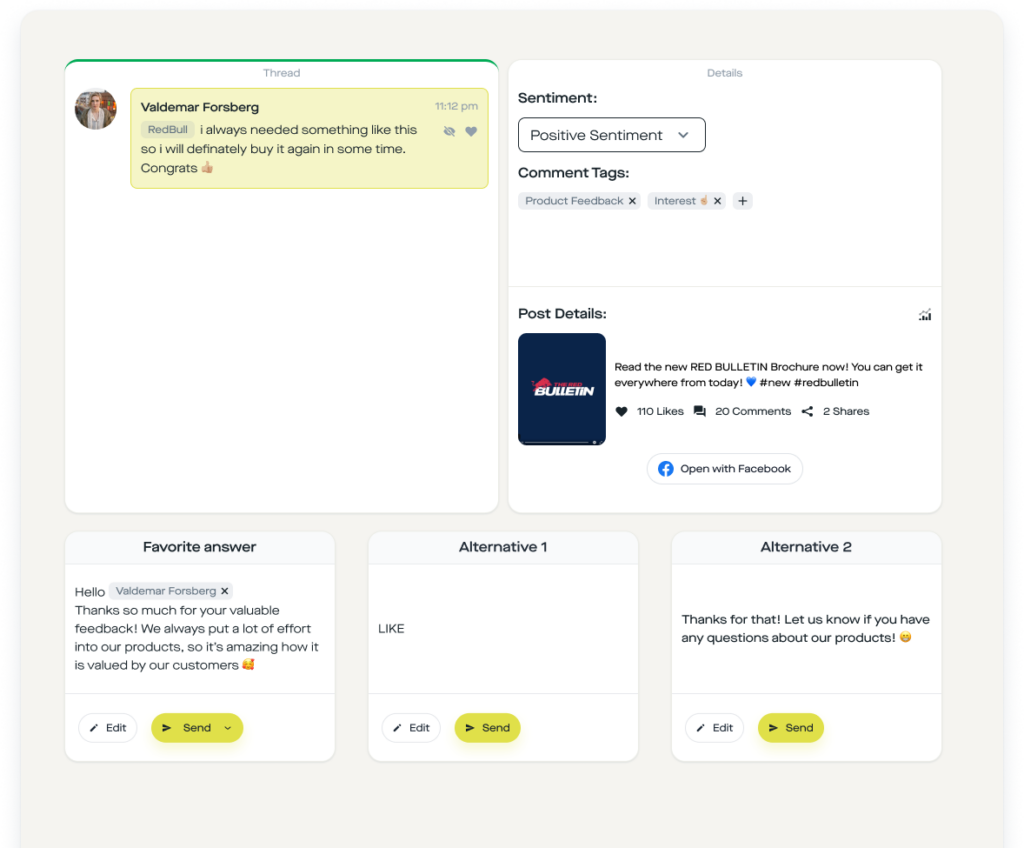
In replient.ai you can set up automations with IF/THEN logic: IF Tag = "Complaint" OR Tag = "Against brand" OR Tag = "Spam" THEN Hide Comment. The tags are assigned automatically by the AI sentiment and tagging engine, trained on your website and historical data of your brand voice. So you can not only filter profanity, but also tag nuanced purchase-intent or price-question comments and respond to them.
Our observation from over a hundred customer accounts: The most effective automation for e-commerce brands is not "hide all negatives", but a selective auto-hide for the three tags Spam, Complaint and Against-Brand, combined with a flag for constructive criticism that a human answers personally. Brands using this two-step approach report double-digit engagement increases, because real discussions remain visible and only genuine junk disappears.
When does hiding comments harm your algorithm?
Whenever you hide constructive discussions. The Facebook algorithm treats reply depth, comment length and interactions as positive signals, if you systematically hide every skeptical comment you remove exactly the interactions that give your post reach. This is especially true for ads, where engagement signals directly affect cost per click.
Our recommendation: Hide only for spam, hate speech or off-topic posts. Constructive criticism, honest product questions and even negative experiences should be answered publicly, they are social proof because they show that your brand is reachable. According to a Pew Research survey, 41% of US users say they have experienced online harassment themselves, and 79% rate platforms' moderation behavior as fair to poor (Pew Research, 2021). If you do it better than the platform, it reflects positively.
Frequently Asked Questions
Does the author get notified when I hide their comment?
No. Facebook does not inform the author that their comment was hidden. They still see their own comment as before, and their Facebook friends also see it. All other users can no longer see the comment (Facebook Help Center, 2026).
Are replies to a hidden comment also hidden?
Yes. When you hide a comment, all associated replies are automatically hidden as well. If you only want to hide individual replies, you have to select each one separately. That makes Hide the most efficient method to remove whole troll threads from public view without discussion.
How can I unhide a hidden comment?
Go to the hidden comment, tap it or long-press it and choose "Unhide comment". You can find hidden comments in the page view via a filter or directly under the affected post when you are logged in as a page admin (Facebook Help Center, 2026).
Which is better, hiding a comment or deleting it?
In 90% of cases hiding is better. The author does not know, there is no escalation, and you can undo it at any time. You should only delete for legal violations, hate speech, doxxing or other clear policy breaches, that is cases where the comment must no longer be visible even to the author.
Can I automatically hide Facebook comments?
Yes, in two ways: Meta's Hidden Words filter automatically hides comments that contain certain profanity or keywords. AI-powered tools like replient.ai go further, they understand context, detect spam, complaints and off-topic comments even in polite language, and automatically hide them via IF/THEN rules based on AI tags.
Conclusion: Hiding is the underrated superpower in community management
Hiding Facebook comments is one of the mildest and most effective tools Meta gives page owners. The author sees nothing, the public sees nothing, you have full control, and you can undo the action at any time.
Key takeaways:
- The author is not notified, they still see their own comment, everyone else does not.
- Their Facebook friends still see the comment, it's invisible to everyone else.
- Replies to hidden comments are also automatically hidden.
- Hiding is almost always better than deleting, with less escalation and more control.
- At 100+ comments per day, manual hiding becomes uneconomical, this is where AI-powered automation pays off.
If you're part of the growing group of brands that moderate several hundred comments per day across Facebook, Instagram and TikTok, take a look at replient.ai. We built the tool that lets you set up auto-hide rules based on AI sentiment and tags instead of clicking comments away one by one.