Summarize this with
 ChatGPT
 Claude
 Gemini
 Perplexity
Preview of the DM automation 👇
- You post a teaser story with the CTA "Reply with LAUNCH" and everyone who replies automatically gets a DM with the waitlist link.
- The flow collects the email address via a collect email step and sends it to the CRM via webhook.
- 24 hours before launch a reminder is sent automatically, so you do not have to remember.
- Story replies have the highest intent of all Instagram triggers, because someone who replies has already seen your story and actively typed.
- Only on Instagram, because the Meta Graph API sends story-reply webhooks exclusively for IG.
The D2C skincare brand from Vienna that I mentioned in our comment-trigger template switched things up after their first launch attempt: instead of comment triggers, they now use story replies for their waitlists. The reason was simple, stories create a different kind of attention. Someone who replies to a story has already moved through the content, seen the product, and actively typed. That is warmer than a comment under a feed post. At their second launch, story replies brought in 40% more email addresses than the feed post.
In this guide you get the flow that automates exactly that, set up in under 10 minutes.
Use this template in replient → try it free for 14 days
The flow at a glance
The complete process, from story reply to launch reminder:
Why Story Reply is the strongest trigger for waitlists
Story replies rank higher in intent than comments and DM keywords. Someone who replies to a story has already done three things: viewed the story, noticed the offer, and intentionally typed. That is more qualified than a comment under a feed post, where many react out of habit.
The numbers back this up. According to LeadResponse (2026), Instagram DMs reach an open rate of around 90%, compared to 15–25% for marketing emails. Responding to a lead within one minute converts 391% better than a 30-minute delay (Harvard Business Review).
Waitlists benefit especially from this channel. According to a GetWaitlist analysis (2025, 500+ launches), waitlist pages convert 2.7 times better than standard landing pages. Combine that with the DM open rate and the effect multiplies: more people see your link, more people click, more people sign up.
Who is this template for?
- D2C Brands, Skincare, Fashion, Food: every product drop with community hype.
- SaaS founders, beta launches, feature releases, early access programs.
- Creators with their own product, merch drops, course launches, digital products.
- E-commerce with limited editions, drops, collaborations, seasonal products.
If you already have an active Instagram community and are planning a launch, this template is your fastest path to a prequalified list.
Why this template only runs on Instagram
The Meta Graph API sends story_reply events exclusively for Instagram. Facebook Stories do not have a comparable reply webhook, so if someone reacts to a FB story, no tool can automatically process that signal.
For Facebook launches there are dedicated templates based on post comment triggers, such as the Product Launch Waitlist Template (comment trigger, works on IG + FB). For this template you need an Instagram Business or Creator account connected to replient.
The 5 steps in detail
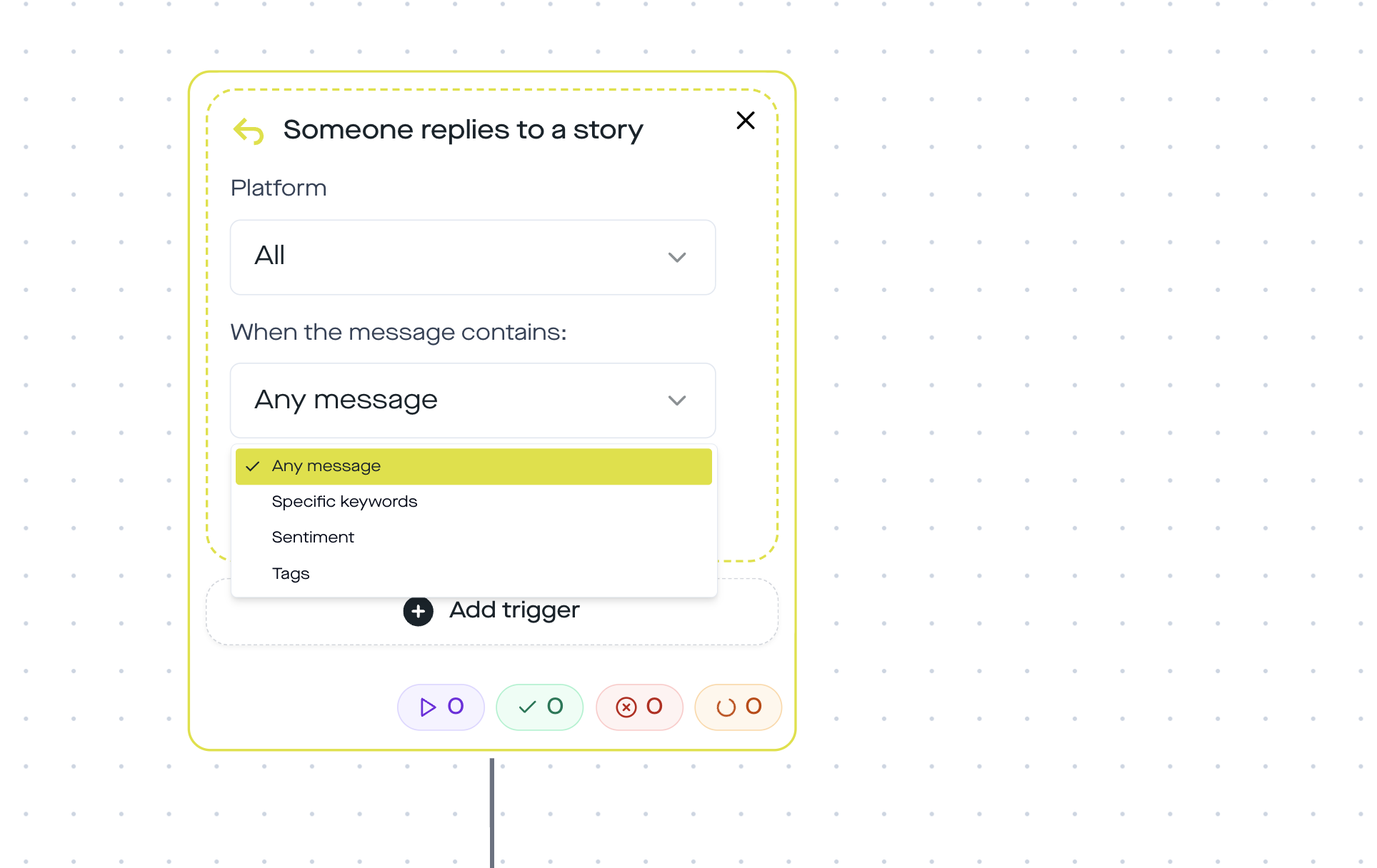
Step 1: Story reply trigger with the keyword "LAUNCH"
The flow starts as soon as someone replies to your story with the word LAUNCH or DABEI. Case-insensitive match, "launch", "Launch", and "LAUNCH" all trigger it. You can add multiple keywords via the And/Or conditions in the builder.
In your teaser story you show the CTA as a text sticker: "Reply to this story with LAUNCH and I'll put you on the waitlist". The clearer the keyword, the fewer false positives.
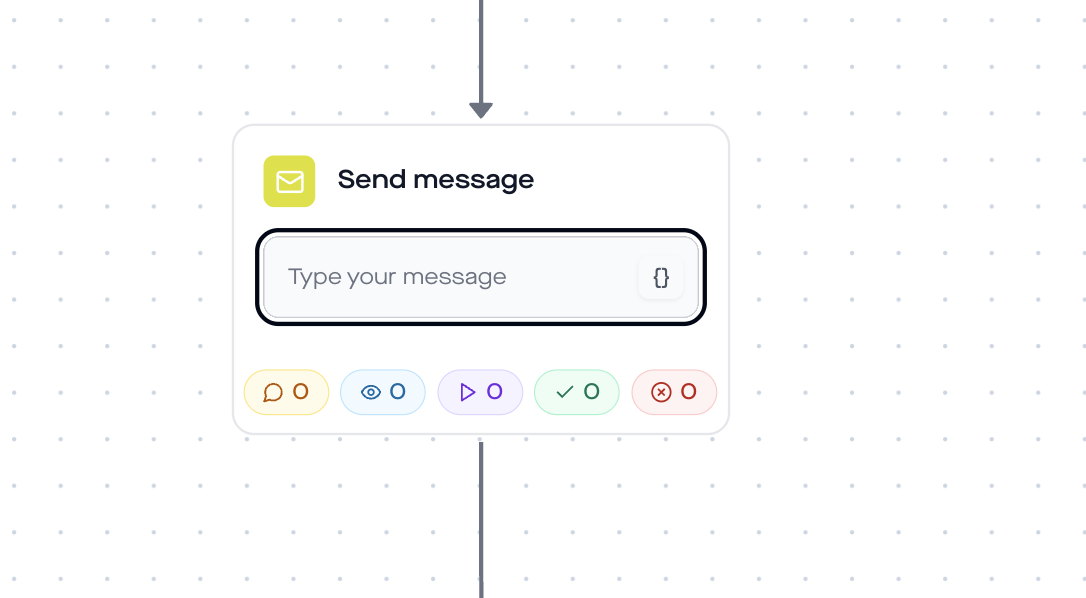
Step 2: Send Message with personalization
The first DM arrives within seconds. replient uses the variable {{contact.username}} to insert the Instagram username directly:
"Hey {{contact.username}} 🔥 You're in, here's the waitlist link for you:"
Step 3: Send Link with click tracking
The Send-Link-Step sends a button with your waitlist link, whether Typeform, Google Form, Shopify landing page or your own site. replient optionally generates a tracking link with a unique shortId, so you can see in analytics how many people from the story-reply flow actually clicked.
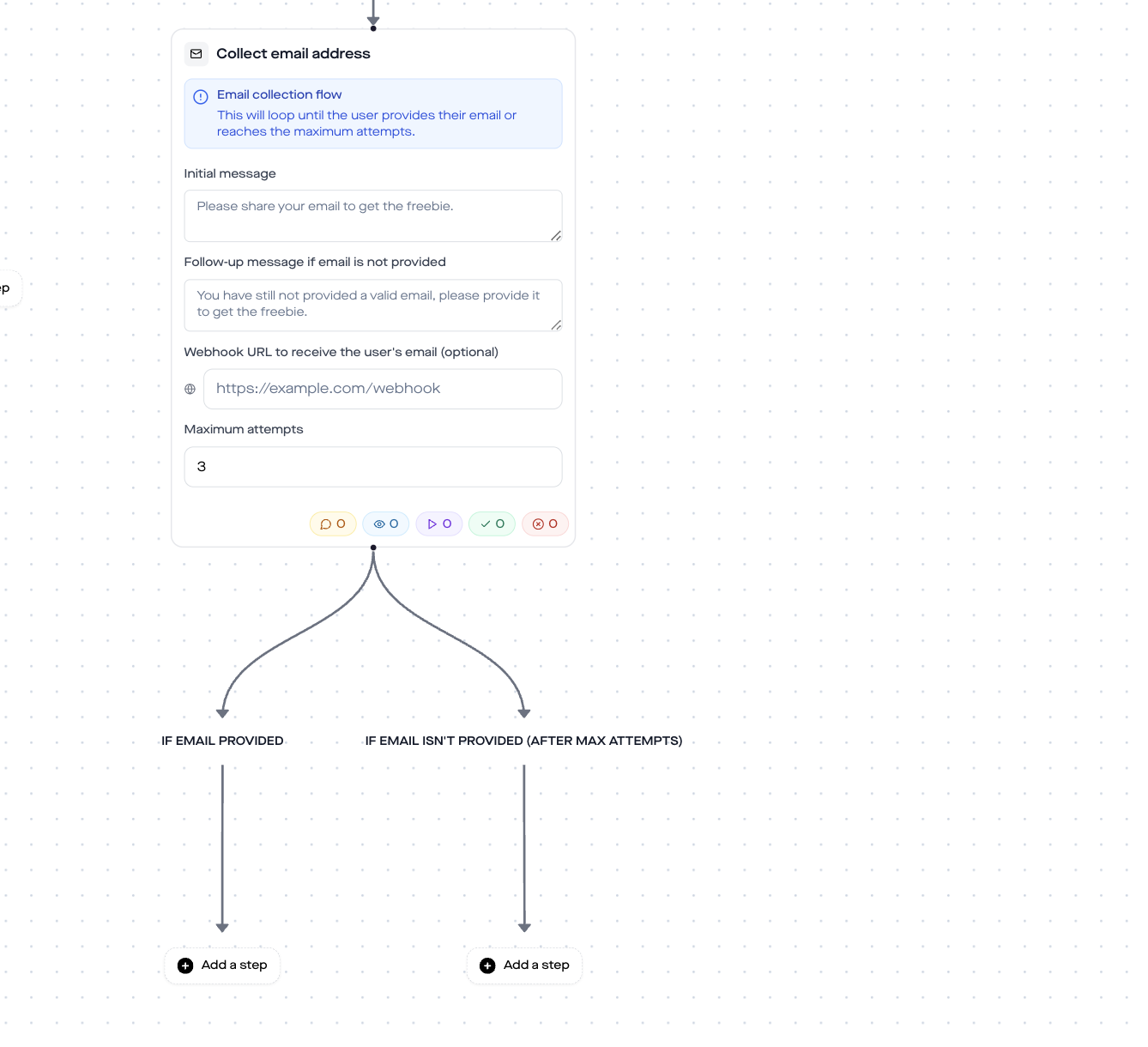
Step 4: Collect Email with webhook
The Collect-Email-Step asks: "Leave your email and you'll be sure to remember on launch day." Email validation runs automatically (regex check). After a maximum of 3 attempts, the flow gives up and continues without an email.
Optionally you send the email via webhook directly to Klaviyo, ConvertKit, Mailchimp or ActiveCampaign. The payload contains {username, email}. Your CRM tool can automatically create a tag or segment from that.
Step 5: Time Delay + Reminder
Set the time delay to the period until your launch, e.g. 48 hours before. The reminder DM says:
"Hey {{contact.username}}, it kicks off in 48 hours 🚀 Here's your link again so you don't have to search:"
The reminder again uses the Send-Link-Step with the same tracking link. That way you see in analytics how many people click only at the reminder, often 20 to 30% of total clicks.
Difference from the comment-trigger template
The Product Launch Waitlist Template (H6) uses a post comment trigger. The difference:
| Criterion | Comment trigger (H6) | Story Reply (H16) |
|---|---|---|
| Trigger | Post comment "WARTELISTE" | Story reply "LAUNCH" |
| Platform | Instagram + Facebook | Instagram only |
| Intent level | Medium, feed comment | High, story already seen |
| Reach | Higher (Feed + Explore) | Lower (story viewers only) |
| Best for | Maximum signups | Qualified signups |
Our tip: Use both templates in parallel, feed post with comment trigger for reach, story with reply trigger for quality. Emails are sent through the same webhook to the same CRM segment.
Best practices
- Keep the keyword short, "LAUNCH" or "DABEI" instead of "I-want-to-be-on-the-waitlist". Fewer typos, higher trigger rate.
- Visually highlight the story CTA, use the question sticker or a text sticker with an arrow. The clearer the call to action, the more replies.
- Combine with a countdown sticker, Instagram's native countdown sticker creates additional FOMO next to your reply CTA.
- Test the webhook, send yourself a test story reply and check that the email arrives in the CRM before you go live.
- Adjust reminder timing, For a 7-day lead time: reminders on day -2 and day -1. For a flash launch: one reminder is enough.
GDPR & Meta compliance
replient.ai is an Austrian company with EU data processing. The Collect-Email-Step obtains active consent (Art. 6(1)(a) GDPR). The user voluntarily types in their email address. No form is prefilled, no data is collected without interaction.
The automation runs through the official Meta Messenger Platform API, no scraping, no unofficial access. replient is a Meta Business Partner. Compared to US-based tools like ManyChat, there is no risk of a GDPR-noncompliant data transfer to third countries.
Frequently asked questions
Do you need an Instagram Business account?
Yes. The Meta Graph API for story replies requires a Business or Creator account. Personal accounts cannot receive webhooks.
Does this also work on Facebook?
No. The Meta Graph API sends story_reply webhooks exclusively for Instagram. For Facebook launches, use the comment-trigger template.
How many story replies can the flow process at the same time?
The Meta API allows up to 200 API calls per hour. At high volume replient automatically queues the DMs, no reply is lost, delivery may be delayed by a few minutes in extreme cases.
Do you have to collect the email address?
No. The Collect-Email-Step is optional. If you only want to use the DM channel, skip step 4. The flow also works without email capture.
How much does replient.ai cost?
Try it free for 14 days with all Pro features, no credit card required. After that, DM automations are available from the Pro plan (from €129/month excl. VAT, 4,000 credits). All DM automation templates are included. Story replies and DMs sent without AI use no credits, and there is no contact limit. View pricing →
Can you use multiple keywords for the same flow?
Yes. In the trigger builder you add multiple keyword conditions, e.g. "LAUNCH", "DABEI", "WARTELISTE". They all trigger the same flow.
How does this differ from ManyChat?
replient handles comments and reviews on 8 platforms (Instagram, Facebook, TikTok, YouTube, LinkedIn, Google Reviews, App Store, Play Store) plus story replies on Instagram and DMs on Instagram and Facebook in one dashboard. ManyChat specializes in DM automation (depending on the plan, Instagram, Messenger, WhatsApp, TikTok, Telegram, SMS and email, among others) but does not moderate your entire comment section. Plus: EU servers, GDPR-compliant, no US data risk.
About the author

Co-Founder, replient.ai
Thomas is a co-founder of replient.ai and works on AI-assisted comment management for social media. He writes about automation, community management and efficient comment moderation for growing brands.