Summarize this with
 ChatGPT
 Claude
 Gemini
 Perplexity
Preview of the DM automation 👇
- You post a flash sale story with the call to action „Reply with CODE“.
- replient likes the reply, sends the discount code via DM and a tracked link to the shop.
- After 2 hours the flow asks back: „Already ordered?“ – and branches into 3 urgency paths depending on the answer.
- After 20 hours: „Last Chance“ reminder before the code expires.
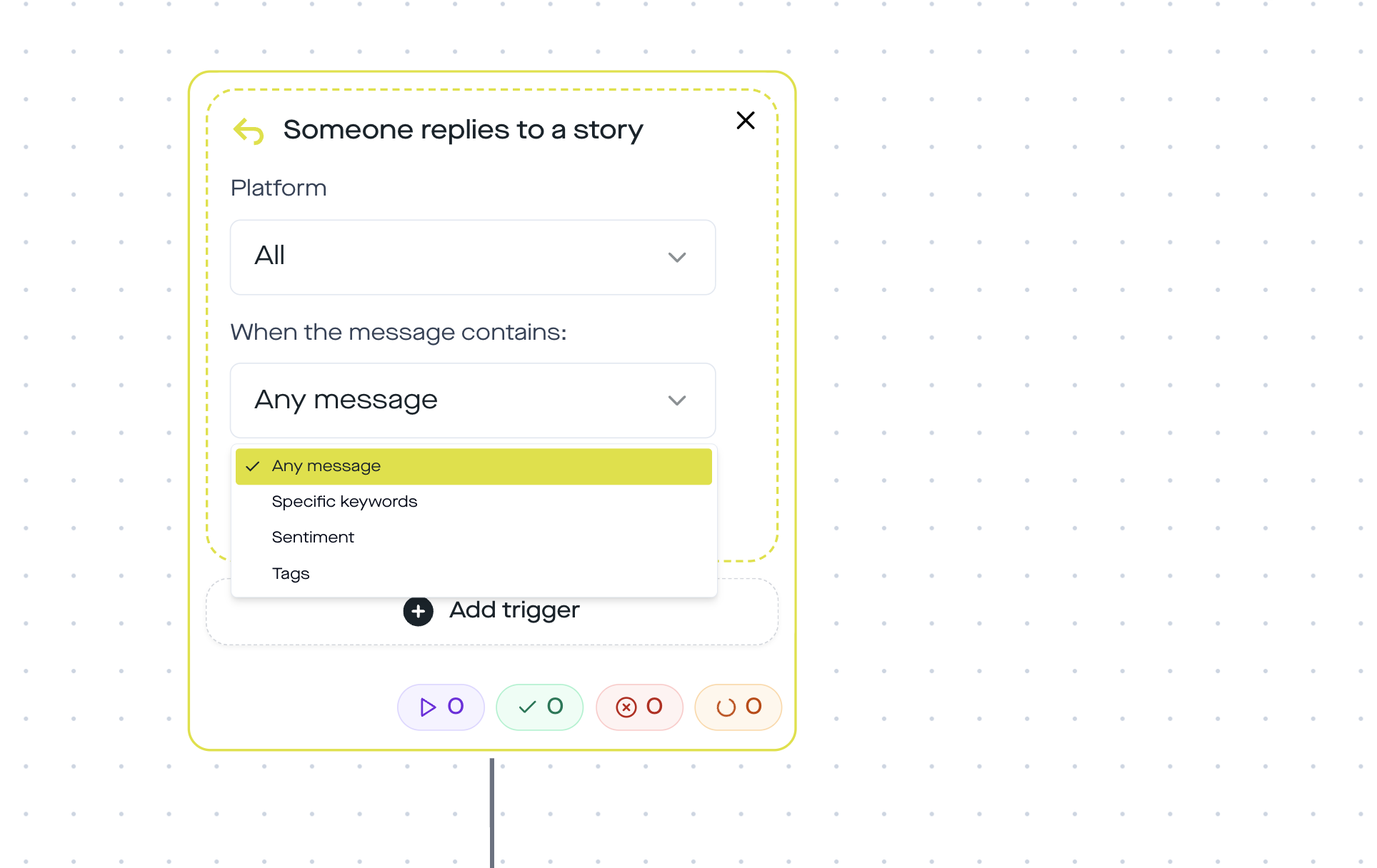
- Instagram only – the Meta Graph API sends story reply webhooks exclusively for IG.
A flash sale rarely fails because of the product. It fails because the discount code is sent manually. 400 story replies in the first hour, you type „DM sent“ and fall behind. With a story reply trigger the logic flips: everyone who replies gets the code and link within seconds – plus an intelligent urgency reminder before the 24 hours run out.
This template is the complete flow that you import once into your replient account and use again for every sale from then on. You'll find the template at the end of the article.
Use the template in replient → Try 14 days free
The flow at a glance
The complete process in one graphic: trigger, main path, three branches after the follow-up question:
Why Story Reply outperforms what you've been doing so far for flash sales
Story Replies are the warmest trigger Instagram offers. Anyone who replies to a story has already moved through your content, seen your offer, and actively typed. According to data from Backlinko, Instagram DMs reach an open rate of around 90 % – well above the email average. Source: Backlinko Instagram Statistics 2025.
On top of that comes the reaction-time factor. A Harvard Business Review study shows: contacting leads within 5 minutes makes you 21 times more likely to qualify the lead than after 30 minutes. Source: HBR – The Short Life of Online Sales Leads. With a flash sale and its 24-hour window the principle becomes even sharper: every lost minute is lost revenue.
Manually you might manage 30 to 50 personalized replies per hour. A replient automation answers 400 or 4,000 story replies in the same time, with identical personalization ({{contact.username}}), an individual tracking link, and the ability to control the follow-up reminder to the second.
Why this template only runs on Instagram
In short: the webhook does not exist on Facebook. The Meta Graph API sends story_reply events exclusively from the Instagram messaging context. Facebook Stories do not have a comparable reply event, if someone reacts to an FB story that does not trigger an automated webhook signal a tool could read.
On top of that, this template uses several actions that, according to the Meta Messenger Platform documentation, are only available in the Instagram channel:
- Like Message, a small heart as confirmation, IG-exclusive.
- Send Audio Message, voice memo as a loyalty touchpoint, IG-exclusive.
- Send Media, product image directly in the DM, not supported to the same extent on Facebook.
For Facebook flash sales there are separate templates based on post comment triggers. For this template the requirement is: Instagram Business or Creator account, connected to replient.
The 6 steps in detail
Step 1: Story reply trigger with keyword „CODE“
The flow starts as soon as someone replies to your story with the word CODE. Case-insensitive match, and you can add extra keywords like SALE or DISCOUNT via the And condition. In the story itself you display the CTA as a sticker or caption: „Reply to this story with CODE – I'll send you the discount code in the DMs“.
Step 2: Like Message as immediate confirmation
A heart within one second after the reply. Sounds small, has a big effect: the user sees that something is happening, the notification bubble pops up, and before the actual DM arrives the contact is already emotionally open. This micro-step is only available on Instagram. Facebook Messenger does not have a comparable like endpoint in the automations API.
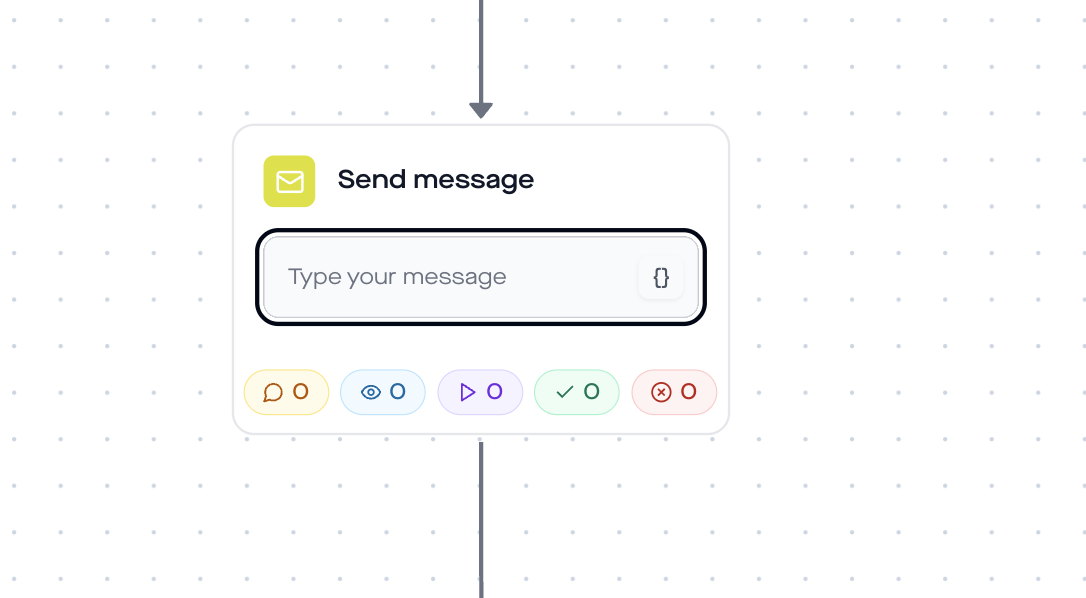
Step 3: Send Message with personalization
The first proper DM uses the name from the Instagram profile. replient pulls the username via the {{contact.username}} variable directly from the Instagram profile field. The message in the template reads:
„Hey {{contact.username}} ❤️ I’ve got something special for you — check it out:“
You can of course adapt this to German. Important: the variable is a real API integration, not a static placeholder. If the user changes their Instagram name, replient will pull the current value on the next flow.
Step 4: Send Link with click tracking
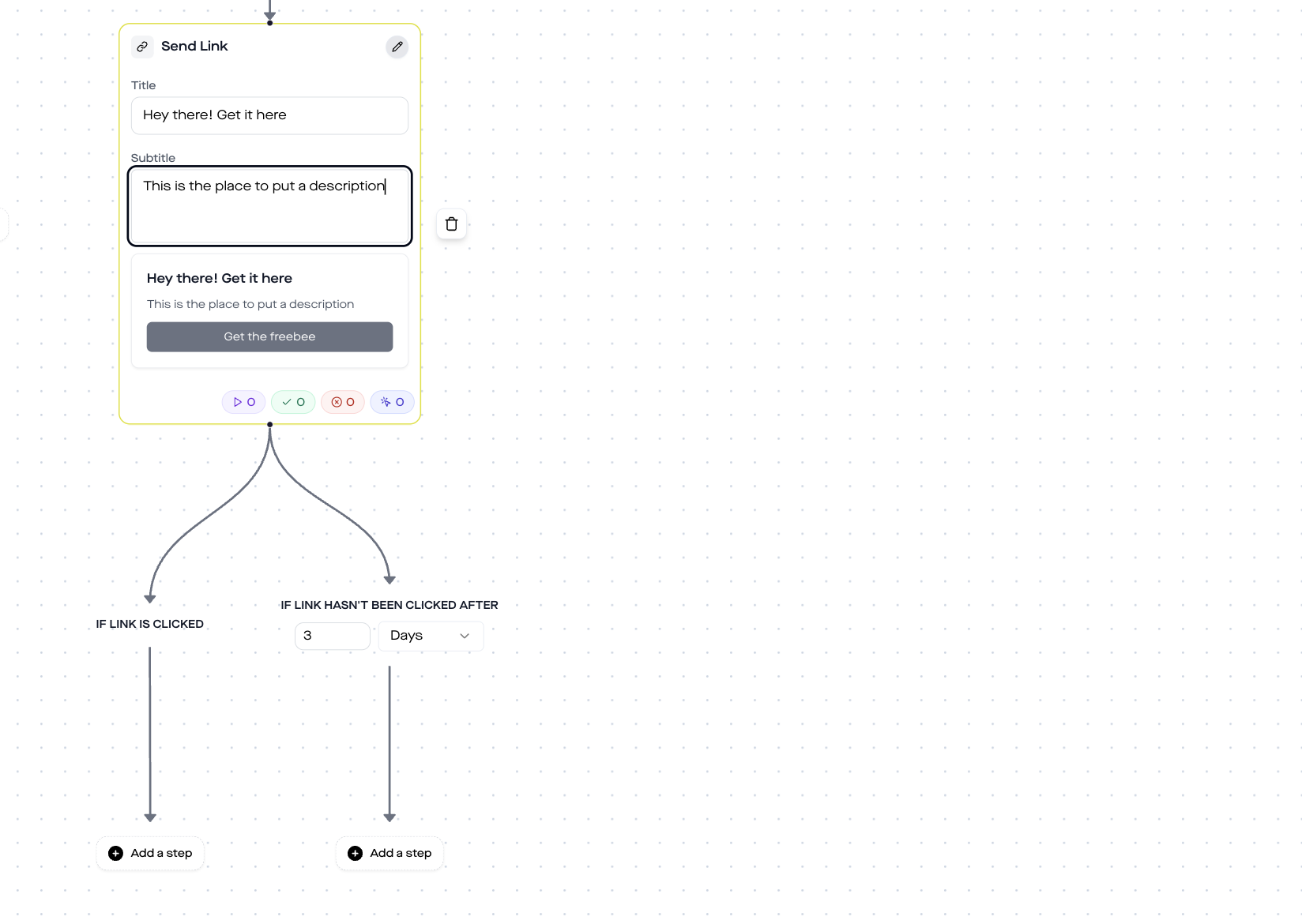
Instead of sending the link raw, replient generates a short share link (/share/[shortId]) and tracks the click. The shortlink briefly redirects via a replient interstitial page, fires the tracking event and then opens your shop. That way you’ll know later in the campaign analysis: how many DMs were sent, how many clicks came back, how many checkout starts?
In the template the button reads „Shop the Collection“ – you can freely adapt the title and subtitle. In Messenger the platform renders a Generic Template tile with image, title, subtitle, and button.
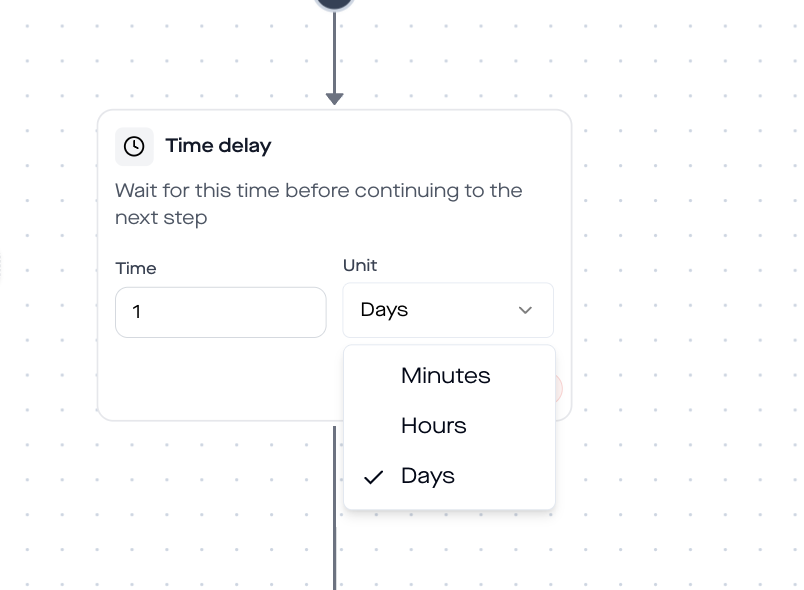
Step 5: Time delay 2 hours
After sending the link the flow waits two hours. Long enough for the active browsing session to finish, short enough for the purchase intent to still be fresh. You can set the delay to minutes, hours, or days, for flash sales I recommend between 90 minutes and 3 hours. Anyone who waits longer loses the urgency window.
Step 6: The intelligence, Ask Question with 3 urgency branches
This is where it gets interesting. The flow asks back: „Hey! Did you already grab something? 😊“ with three button options:
- „Yes, just ordered“ → loyalty path. replient sends a voice message („I'm so happy, thank you!“) plus a thank-you follow-up. Perfect for creators and personal brands – and Facebook Messenger has no voice memo API, this is IG-exclusive.
- „Still browsing“ → product reminder path. The flow sends a product image plus the code SALE20 with a clear expiry note „24h only“ and another shop link.
- „Too expensive“ → price objection recovery. Instead of losing the lead, there's an extra discount. The message: „I get it – here's a little extra: SALE20 for 20 % off. Maybe that changes things? 😉“
In parallel an If contact hasn’t replied after 3 days branch runs, which triggers the „Last Chance“ reminder after 20 hours if no answer comes in. That way nobody drops out of the flow without having had at least two chances to buy.
Flash sale example: 340 story replies in 3 hours
A quick look at a real case from an onboarding call in early April: A skincare brand from Vienna, 28k followers, shares a flash story at 18:00 with the CTA „Reply with CODE for 20 %“. Three hours later: 340 story replies, 312 triggered DMs (the gap being cases with duplicate replies or typos), 178 click-throughs, 41 orders with code SALE20 in the first 90 minutes.
„I never could have managed that manually. I would have given up after 45 minutes and the second wave would have been completely lost.“ – the founder, when asked what the flow delivered.
What she didn't know: the flow also caught the four „Too expensive“ replies and converted two of them into orders. That's the difference between an automation that just sends data and one that handles objections.
Who this template is really for
- D2C brands with recurring flash sales (Black Friday, launch weeks, Christmas, summer sale).
- Fashion and beauty labels with a strong Instagram Story push and need to deliver product images via DM.
- Creators and personal brands who want to give affiliate or course discounts exclusively to Story engagers.
- Agencies that manage multiple shop clients at once and don't want to type DMs manually in every account.
Less suitable: services with complex buying processes (consulting, SaaS demos) – the Coaching Lead Gen flow works better there.
Setup guide: live in 10 minutes
- In replient go to Automations → New Automation. Select the template „Story Reply Discount Code“.
- Adjust the trigger keyword (default „CODE“, freely selectable – important: a unique word that doesn't appear in normal story replies).
- Match send-message texts to your brand voice. Leave the variable
{{contact.username}}as is. - Send Link: insert the shop URL, title e.g. „Get the Collection“, subtitle e.g. „Exclusive access“.
- Adjust the discount code in the send-message nodes of the branches (template default: SALE20).
- Post the story: a big CTA „Reply with CODE – I'll send you the discount in the DMs“.
- Watch live in Analytics how the curve is trending.
Five pitfalls and how to avoid them
- Keyword too generic. If you use „YES“ or „HI“ as the trigger, you'll also catch random replies. Use a unique product- or sale-specific word (e.g. SUMMER25, LAUNCH, BLACKFRIDAY).
- Discount code limit not set on the shop page. The flow sends the code, but Shopify/WooCommerce allow unlimited redemptions. Set a per-customer limit or an overall capacity in the shop itself.
- Story without a clear CTA sticker. Users won't reply with „CODE“ on their own. A text sticker with the exact call to action („Reply with CODE„) noticeably increases the reply rate.
- Forgetting the 24h messaging window. Outside the 24-hour window after the last user interaction, Instagram only allows limited DM types. The „Last Chance“ reminder after 20 hours is deliberately set so it still lands within the window.
- No dedicated landing page. Linking directly to the cart with a prefilled code converts measurably better than sending users to the standard collection page, where the user has to enter the code only at checkout.
GDPR, Meta Partner, Business Account
replient is a Meta Business Partner, the server location is the EU, and a data processing agreement under Art. 28 GDPR is in place. The flow itself collects no personal data that isn't already part of the Instagram profile – username, profile picture URL, message content. If you later attach a Collect Email step (e.g. for a newsletter sign-up after purchase), you need a documented opt-in under Art. 6 (1) (a) GDPR. The template itself is designed without email capture.
About the business account: Instagram DM automation works exclusively with a business or creator account connected to a Facebook Page. This is a Meta platform requirement, not replient-specific.
Next steps
If you like the Story Reply trigger, check out the related templates:
- Story Reply Link – when you simply want to deliver a link instead of a code.
- Story Reply Freebie – PDF or free download via story reply.
- Instagram Giveaway – comment-to-DM instead of story reply, for higher reach.
You'll find the complete context on the DM flow builder in the DM automation guide. And if you're in the process of moving away from ManyChat, the ManyChat alternative page is better reading than yet another setup article.
Frequently asked questions
Do I need an Instagram Business Account?
Yes. Instagram DM automation is allowed by the Meta Graph API only with a business or creator account connected to a Facebook Page. Private profiles cannot receive webhooks.
Can I use this template on Facebook as well?
No. The Story Reply trigger, the Like action and Send Audio are Instagram-exclusive. For Facebook flash sales there is a separate template based on post comments, which can be found in the template overview.
How many discount codes can the flow send at the same time?
Technically no hard limit – Meta has a general Messenger Platform rate limit (currently 250 calls per second per page, see Meta rate limiting doc). In practice that means: thousands of DMs per hour are easily possible.
What happens if someone replies with „CODE“ inside a long sentence?
The trigger uses a case-insensitive substring match. Replies like „Please send me the code“ or „CODE please!“ trigger the flow. Only when the keyword doesn't appear at all does nothing happen.
Is a click-tracking link legally unproblematic?
Yes, as long as you use it transparently. replient shortlinks redirect within 3 seconds (configurable) and only store an anonymous click event, no personal data. Additional third-party analytics (e.g. GA4 on the landing page) require the usual cookie consent setup.
Can I connect the template to my Shopify store?
Yes. replient passes the tracking shortlink to Shopify (or WooCommerce / Shopware), order attribution then runs via UTM parameters on your landing page, which you simply append to the URL in the send-link step. The discount code itself is maintained in the Shopify backend, replient only sends out the code string.
How much does sending messages cost?
The DMs themselves are free – Meta charges no fee for Messenger or Instagram DM automations within the 24-hour messaging window. Costs only arise for the replient plan; details on replient.ai/preise.
Load template
The complete flow, including 3 urgency branches, a voice memo bonus, and a last-chance reminder, is saved as a template in replient. Set it up once, use it again for every sale.
Load template now → Try 14 days free
About the author: Thomas Danninger is Co-Founder and CTO of replient.ai. Since 2022 he has been building AI-powered comment and DM management systems for D2C brands and agencies in the DACH region. This template is based on real flash sale flows that replient customers like SNOCKS, Health Routine, and Zauberfein run in production.
About the author

Thomas Danninger
Co-Founder, replient.ai
Thomas ist Co-Founder von replient.ai und Experte für KI-gestütztes Social Media Kommentar-Management. Er schreibt über Automatisierung, Community Management und effiziente Kommentar-Moderation für wachsende Brands.